my site is only partially visible

This morning my site is only partially visible, you can't see the header, footer and other modules
-

Hi Emiliano,
Thank you for reaching out to us.
We apologize for the inconvenience. We have recently received similar reports.
To address the issue, please try making some minor changes on your pages or in your global header and footer, such as adding extra letters or moving some elements. Save your changes and update the page. Afterward, undo your changes and preview the site to see if this resolves the issue.
This approach has been successful for another customer who encountered a similar issue in this support thread: https://support.brizy.io/hc/en-us/community/posts/20307368904594
Alternatively, you can also revert to the older versions using the following link: https://tinyurl.com/mr3b4bev
Here are the steps to roll back:
1. Navigate to the Plugins section and uninstall both Brizy and Brizy Pro.
2. Upload and activate Brizy first.
3. Next, upload and activate Brizy Pro.Please try these steps and inform me of the outcome. We will keep you updated once we have resolved the issue with the recent update.
Best regards,
Ariel H.0 -
Ok The best way is downgrade Brizy. Now work fine, thanks.
Please let me know when the update is stable.
Thanks
Emiliano
0 -
I'm sorry but after downgrade I can't create new articles, all I get is a blank page.
Can you help me?
Thanks
0 -
Hi Emiliano,
Thank you for the update.
This is something we need to inspect from your WP Admin page. Please add us as an Admin user to your WordPress Dashboard and send the following details to: communitysupport@brizy.io
Community Post link: https://support.brizy.io/hc/en-us/community/posts/20336761931794
WordPress Admin URL:
Username:
Password:Please make a full backup of your site as a precaution.
Best regards,
Ariel H.0 -
Hi Emiliano,
Thank you for your cooperation.
Please also provide your site's login URL as the default WordPress login URL is returning error 404.
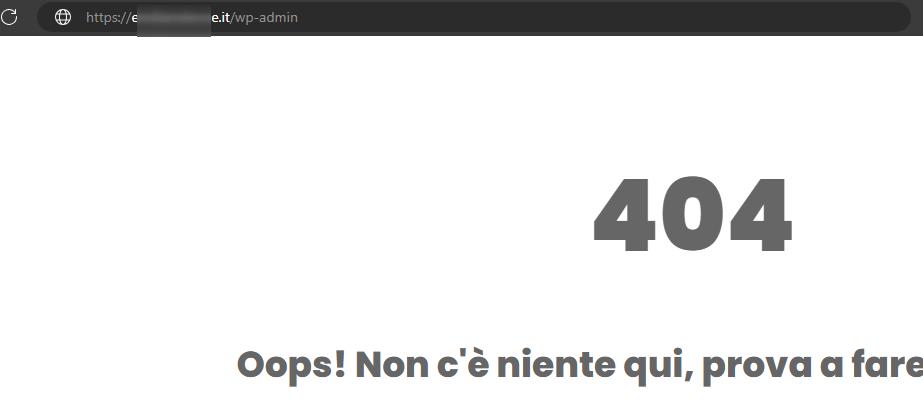
I am looking forward to your response.
Best regards,
Ariel H.0 -
Hi Emiliano,
Thank you for the update.
We need your complete WordPress Admin login URL (e.g., https://yourwebsite.com/wp-admin) as the /wp-admin URL is not working on your site. It is possible that a plugin has been used to alter your WP Admin URL, as a result, your site is throwing an error - https://youtu.be/fGDERpcUTls.
Alternatively, can you install the "Temporary Login Without Password" plugin and share the access link with us? Kindly grant access for 72 hours. You can download the plugin from here: https://wordpress.org/plugins/temporary-login-without-password/.
I look forward to your response.
Best regards,
Ariel H.0 -
have you solved the problems in version 2.5? When will it be possible to install it?
0 -
Hi Emiliano,
Thank you for the update. Unfortunately, this issue is still ongoing.
You can try to fix the issue, by making minor modifications to your pages, dynamic templates, or in your global header and footer, such as adding extra letters or adjusting elements. Save the changes and update the page. Next, undo your changes, update the page again, and preview the site to check if this resolves the issue.
If it is urgent and you manage multiple websites, you can access the previous version of Brizy Pro through this link - https://tinyurl.com/mr3b4bev.
If you are considering reverting to older versions, please also disable automatic updates to prevent the Brizy free version from updating after installation - https://www.wpbeginner.com/wp-tutorials/how-to-disable-automatic-updates-in-wordpress/.
The easier approach is to install "Easy Updates Manager plugin" as described in the above article to disable automatic updates.If you have any further questions, please let us know.
Best regards,
Ariel H.0
Please sign in to leave a comment.
Comments
8 comments