All forms broken after recent Brizy update

Hi all. Yesterday, I realized that all menus had disappeared from my site. I then found the information about a recent update breaking the global header. I called my host, Bluehost (because they have fantastic customer service) and they were able to update something on their end that fixed it. Then this morning, I realized that all forms on my site are inoperable, and there is nothing I can do to get an operable form. All forms get a red error message saying message was not sent. All forms worked beautifully prior. I am presuming this problem is also related to the recent update. I called Bluehost - they said the problem is with Brizy, and to reach out to Brizy customer service. Anyone know anything about this? I am using Brizy Pro. Thanks!
-

Hi Julia,
Thank you for reaching out to us.
This is something we need to inspect from your WP Admin page. Please add us as an Admin user to your WordPress Dashboard and send the following details to: communitysupport@brizy.io
Community Post link: https://support.brizy.io/hc/en-us/community/posts/20331040084882
WordPress Admin URL:
Username:
Password:
URL of your contact form:Please make a full backup of your site as a precaution.
Best regards,
Ariel H.0 -

Hello there,
i have the same Issue that after the Update all my forms are broken!
When trying to send an email all i get is a "Your email was not sent", this is very problematic since my customers depend on it! Do we have any Progress on this?0 -
Hi Armin,
Thank you for contacting us.
Please try duplicating the form and reconfiguring it as well. If this does not resolve the issue, kindly follow the previous steps to share your WP Admin credentials. Additionally, include the URL of your contact form so we can inspect it.
Best regards,
Ariel H.0 -
Hey Ariel,
I tried the duplication and reconfiguration, none of it worked sadly. I wont be able to provide you with Credentials because of my client.
The URL to the contact form is as following: https://sabine-fleischer.de/kontakt
I hope this is somewhat of a help, thanks!0 -
Hi Amin,
Thank you for the update.
Please try the following to troubleshoot the issue:
1. Temporarily disable all third-party plugins besides Brizy and Brizy Pro and check if this resolves the issue.
2. If this didn't help, try the steps on this link to configure the form to use SMTP:
https://support.brizy.io/hc/en-us/articles/360043766792-Email-notification-via-SMTPPlease consider testing your SMTP settings using an external service such as https://www.gmass.co/smtp-test to verify their functionality before configuring the form.
Please try this and let me know how it goes.
Best regards,
Ariel H.0 -
Hi Ariel,
All third plugins were disabled, cache cleared in browser still not working, the form is used via SMTP already, the additional SMTP test did pass.
It cant be just the two of us who are having form issues, i guess many more users are not even aware of it, 2.5.1 Update did break the forms and global elements for sure.Any other ideas?
0 -
Hi,
Upon inspection, your contact form is generating a 400 error, suggesting a problem with the receiving email server or email address. Could you please try configuring a different email address to see if this resolves the issue?
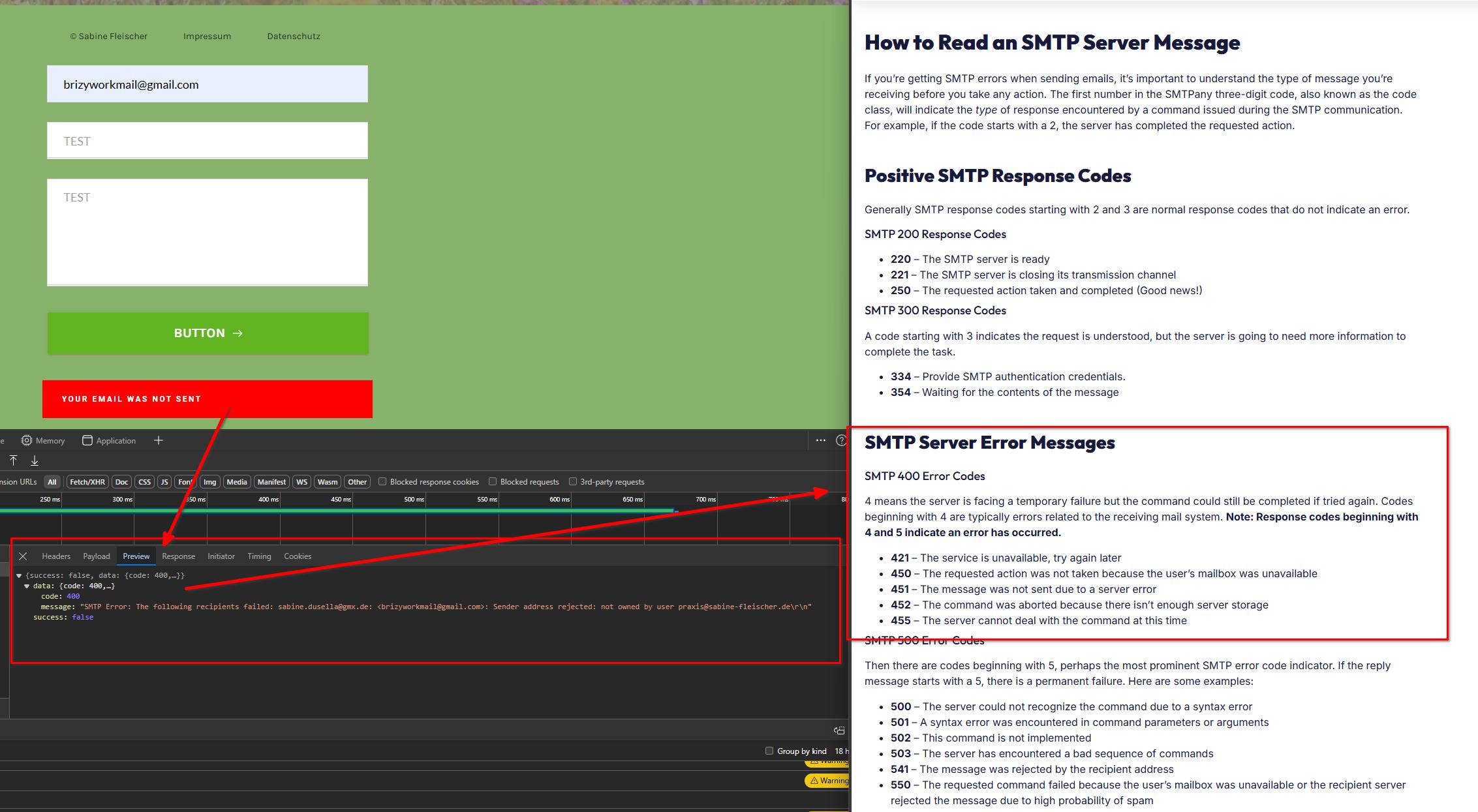
We have created a test page here to replicate the problem, but the error does not occur - https://staging.pro-site.cloud/test01/contact-us/
Please give this a try and inform me of the outcome.
Best regards,
Ariel H.0 -
Great Thanks its working !
0
Please sign in to leave a comment.
Comments
8 comments