Latest update HELP

I have a few sites on WP Pro that auto update, and the new Brizy update has caused issues.
The global headers and footers disappeared on the front end. Still visible in the builder so saved them, then deleted them on the page, and then brought them back in from Saved. And that did the trick. The individual headers were not affected (don't have any individual footers to know)
Another issue - the logo and some images won't populate on a couple of the sites. I have deleted and re-uploaded them again with different file names, but still not working. No caching is on them. Have viewed in incognito.
What can i do?
-

Hi Claudia,
This is something we need to inspect from your WP Admin page. Please add us as an Admin user to your WordPress Dashboard and send the following details to: communitysupport@brizy.io
- Community Post link: https://support.brizy.io/hc/en-us/community/posts/20302513906834
- WordPress Admin URL:
- Username:
- Password:
Please make a full backup of your site as a precaution.
In the meantime, please ensure that you are using the latest versions of both Brizy and Brizy Pro.

Best regards,
Ariel H.0 -
Hi Claudia,
Thank you for your cooperation.
We're currently looking into this issue. I will get back to you as soon as I have an update.
Best regards,
Ariel H.0 -
Hi, what's the update on this please?
0 -
Hi Claudia,
I apologize for the delay.
The problem seems to be related to server-side cache. Please verify with your hosting provider if this feature is enabled and request them to clear the cache. Alternatively, kindly grant us temporary access to your hosting control panel to further investigate the issue.
I am looking forward to your response.
Best regards,
Ariel H.0 -
It's a client's hosting and they're on holiday...
0 -
Hi Claudia,
Sorry about that.
If it is urgent and you manage multiple websites, you can access the previous version of Brizy Pro through this link - https://tinyurl.com/mr3b4bev.
If you are considering reverting to older versions, please also disable automatic updates to prevent the Brizy free version from updating after installation - https://www.wpbeginner.com/wp-tutorials/how-to-disable-automatic-updates-in-wordpress/.
The easier approach is to install "Easy Updates Manager plugin" as described in the above article to disable automatic updates.If you have any further questions, please let us know.
Best regards,
Ariel H.0 -
Hi Ariel,
I've cleared the caches and it made no difference. I have also deactivated all plugins except Brizy and Brizy pro and the issues persist.
On further investigation on another affected website, it appears that the issue on the homepage is related to how Brizy is handling image URLs. Specifically, Brizy is dynamically generating query strings for images on the homepage, whereas on other pages, the images are statically linked.This is on a non homepage and works(shows all images fine):
<source srcset="https://fintoca.com/wp-content/uploads/brizy/imgs/ 1x, https://fintoca.com/wp-1-Financial-Processes- 327x245x0x0x327x245x1699874893 .png content/uploads/brizy/imgs/1- 2x" media="(min-width: 992px)">Financial-Processes- 654x490x0x0x654x490x1699874893 .png
However on the homepage looking at the same element (not showing any images) <source srcset="https://fintoca.com/?brizy_media=wp- 1x, https://fintoca.com/?brizy_86d8b74faec2942f34e3f7b42fc434 a1.png&amp;brizy_crop=iW% 3D135%26iH%3D135%26oX%3D0% 26oY%3D0%26cW%3D135%26cH%3D135 media=wp- 2x" media="(min-width: 992px)">86d8b74faec2942f34e3f7b42fc434 a1.png&amp;brizy_crop=iW% 3D270%26iH%3D270%26oX%3D0% 26oY%3D0%26cW%3D270%26cH%3D270 The issue is appearing on multiple sites that are using different hosting providers too.I can now give you access to the cpanel access of one or more of the websites to have a look. Let me know how I should send this to you :)
Many thanks,
Baxter0 -

Hello Baxter,
Kindly share with us one of your website's WordPress credentials. We will take a look. Please add a new user to your WordPress Dashboard and send the following details to our email: communitysupport@brizy.io
- Community Post link: https://support.brizy.io/hc/en-us/community/posts/20303965160594
- WordPress Admin URL:
- Username
- Password
Please let us know in this forum when you send us the email.
0 -
Hi George,
I've sent an email to communitysupport@brizy.io with logins for 2 websites that have this issue.
but others have it too
Many Thanks
Baxter0 -
Hi Baxter,
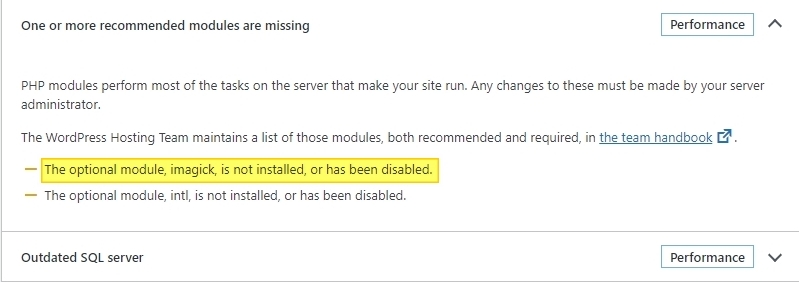
An optional PHP module called Imagick is missing in the fintoca.com WordPress instance. Kindly login to your cPanel and add this module and check if the image issue resolves. Kindly follow the procedure in this screen recording to add this module https://jmp.sh/DA2Fz5uZ
 0
0 -
Hi George ive tried doing that and it hasnt brought back the image, removed maintenance mode and reloaded cache and open in incognito.
Any other thoughts ? did you get my email with logins ? do you need cpanel access as well ?
Thanks
Baxter0 -
Hi Baxter
I removed the logo image and added it back then saved my work by clicking on the "Update" button at the bottom right corner. The images on your website frontend are now visible. Please check
If another website has the same issue, kindly try these steps
- Add the PHP Imagick module in cPanel
- Remove an image and add it back
- Click on the "Update" button at the bottom right corner and check the website frontend
0
Please sign in to leave a comment.
Comments
12 comments