Not able to Publish or Save any pages after update on multiple websites.

Just did the new WP update on multiple websites and unable to publish/save changes on any that were updated.
-

Hi Ian,
Thank you for contacting us.
Please make sure that you have installed the latest versions of Brizy and Brizy Pro.

If the issue persists, also consider editing your pages in incognito mode or using another browser to see if this resolves the problem.
Please give this a try and inform me of the outcome.
Best regards,
Ariel H.1 -
Yes, these have been updated and incognito checked. Now headings and footers have disappeared with the new update. If I revert back to previous Brizy they reappear. I have cleared cache and tried on wifi and on mobile network.
0 -
Hi Ian,
Thank you for the update.
This is something we need to inspect from your WP Admin page. Please add us as an Admin user to your WordPress Dashboard and send the following details to: communitysupport@brizy.io
Community Post link: https://support.brizy.io/hc/en-us/community/posts/20300021786258
WordPress Admin URL:
Username:
Password:Please make a full backup of your site as a precaution.
In the meantime, could you also please try disabling all other plugins except for Brizy and Brizy Pro to see if the issue persists? If the issue does not occur with other plugins disabled, it is possible that there may be a conflict with one of the third-party plugins installed on your site. Additionally, you can try temporarily switching to another theme to determine if the issue is related to your current theme.
Best regards,
Ariel H.0 -

we have same issue with disappear header/footer in all sites using Brizy at the same time
1 -

For me the issue turned out to be Wordfence plugin, if you disable the firewall option within it you will be able to save brizy pages again.
1 -

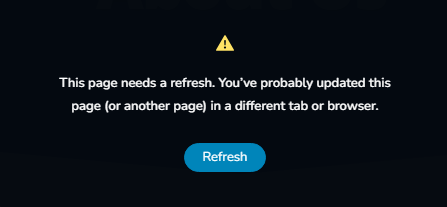
I'm having this exact same issue. I just updated a lot of plugins, including Wordpress (to 6.6) and now I can't make any updates to pages (using Brizy) without seeing that "This page needs a refresh." message. I've never seen that message before.
0 -
Hi Quang,
Thank you for contacting us.
We're currently looking into this issue. I will get back to you as soon as I have an update.
Best regards,
Ariel H.0 -
Hi Alex,
Thank you for sharing your solution. We're currently looking into this issue, please keep it disabled until we have an update to address the issue. Sorry for the inconvenience.
Best regards,
Ariel H.0 -
Hi Jeff,
Thank you for reaching out to us.
If you are using WordFence, please also disable it and see if this fixes the issue.
Please try this and let me know how it goes.
Best regards,
Ariel H.1 -
Thanks for your quick response. Yes I do have WordFence, and it sounds like others have said that disabling the firewall (I have yet to confirm) may solve this issue. Unfortunately my site is under constant attack, so I don't think I can disable WordFence. I'll await a different resolution.
0 -
Hi Jeff,
You may also consider temporarily setting it to Learning Mode, which will also resolve the issue:
https://www.wordfence.com/help/firewall/learning-mode/Best regards,
Ariel H.0 -
Heya Ariel, I just had a chance to try your suggestion, and wanted to let you know that it worked! After putting Wordfence's firewall into "Learning Mode" I was able to save my edited page. Not only that, I was then able to turn the firewall back on, and still make changes. So maybe Wordfence "learned" that Brizy actions were okay? Either way, I'm happy things are working again.
0 -
Hi Jeff,
I'm glad that this is now sorted out. Indeed, that's the process in WordFence Learning mode: you make slight adjustments to your pages and then revert to "Enabled Protection."
Best regards,
Ariel H.0
Please sign in to leave a comment.
Comments
13 comments