Page access/editing

I cannot edit a particular page within my website. I've turned off all plugins other than brizy (I have brizy pro), I can edit other pages.
Please help.
-

Hi Kate,
Thank you for your contacting us.
From my observation, the issue appears to be related to pages with so many page revisions.
To address this issue, I recommend trying the steps outlined in this link to see if it resolves the issue:
https://www.elegantthemes.com/blog/wordpress/how-to-manage-wordpress-revisions-to-optimize-site-performanceIn the above article offers a manual method of limiting page revisions using PHPMyAdmin, or you can opt for WP Optimize, which is simpler to operate.
Please give this a try and inform me of the outcome.
Best regards,
Ariel H.0 -
Hi Ariel,
Thank you for your speedy response! I added the WP-Optimize plugin and ran it - all seemed to go well.
I still cannot access the one page that needs immediate editing. It is the Scholarship info page.
Please let me know what else I might do.
Thanks,
Kate
0 -
Hi Kate,
Thank you for the update.
Could you please try editing the page in incognito mode or using another browser to see if this makes any difference? Additionally, consider increasing the current PHP memory limit to address the issue.
To check the current memory limit in your WordPress installation, please refer to this guide: https://imgur.com/a/aPHAPH2.
If the memory limit is 256M or lower, try increasing it to 512M or higher for optimal performance. You can adjust the memory limit by following the steps outlined in this link: https://www.hostinger.com/tutorials/wordpress-memory-limit. If the limit is already set higher or if you encounter any difficulties, please contact your hosting provider for assistance.
Please try these steps and let me know the outcome.
Best regards,
Ariel H.0 -
Hi Ariel,
I've tried a private/incognito window as well as a new browser without any success.
I have been access all the other pages within this site just not this one.
Kate
0 -
Hi Kate,
Thank you for the update.
This is something we need to inspect from your WP Admin page. Please add us as an Admin user to your WordPress Dashboard and send the following details to: communitysupport@brizy.io
Community Post link: https://support.brizy.io/hc/en-us/community/posts/20185793601682
WordPress Admin URL:
Username:
Password:
URL or name of the problematic page:Please make a full backup of your site as a precaution.
Best regards,
Ariel H.0 -
Hi Kate,
Thank you for your cooperation.
I attempted to log in with the provided credentials, but they don't work. Could you please review and resend the login details?
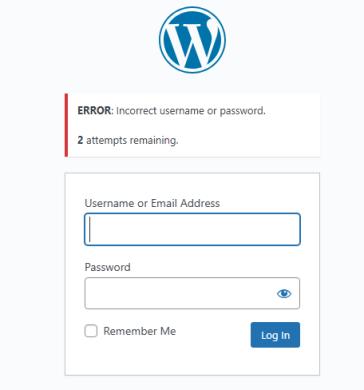
Best regards,
Ariel H.0 -
Hi Ariel,
I've just sent an email with the info.
Please keep me posted.
Many thanks,
Kate
0 -
Hi Kate,
Thanks for the update.
Upon checking, it appears that this page is corrupted. Despite deactivating both Brizy and Brizy Pro, the page should ideally remain editable using the Gutenberg editor; however, it does not open. All other pages open in Gutenberg.
This is demonstrated on this screencast: https://youtu.be/Z7tjZHH75gw
If you used the Duplicate Page plugin to create this page, we don't recommend this approach as it could break your page. The best way to duplicate a page is by saving it as a layout or block and reusing them in your other pages.
Unfortunately, there's not much we can do to help with this issue; you will have to rebuild this page again. Sorry for the inconvenience.
Best regards,
Ariel H.0 -
Hi Ariel,
I am still struggling with a page within my website.
I created a new scholarship page, got it published but now I cannot access it to edit it. It has many popups for the individual scholarship info. I thought the number of popups might be an issue.
So I created a test page eliminating most of the popups, I could edit it while creating it but cannot get it to load now.
Any help and suggestions you can share would be so helpful.
Thanks,
Kate
0 -
I can edit with the wp/guttenberg with brizy and brizy pro deactivated, but not with either of them activated.
Kate
0 -
Hi Kate,
Thank you for keeping in touch.
We recently released an update to Brizy and Brizy Pro that conflicted with WordFence. I assume that your site has automatically updated Brizy and Brizy Pro since the last time I accessed your site and editing of your pages was functional.
In this scenario, please follow these brief instructions:
- In the WordFence plugin settings, navigate to Firewall;
- Enable Learning Mode - https://jumpshare.com/v/3JWEACZsgmaMzJPdDdYs
- Return to your Brizy page, make some minor changes, and then update the page;
- Once done, return to the WordFence settings and re-enable the Enabled and Protecting option.
Please let me know if this resolves the issue.
If you do not have WordFence, please grant access to your WP Admin page again so we can investigate your site. Follow the same process as described above to provide your credentials.
Best regards,
Ariel H.0
Please sign in to leave a comment.
Comments
11 comments