Transparent Header

I am following one of your guides to make Transparent Header for a Brizy made theme using negative margin.
Guide:
https://www.youtube.com/watch?v=4h2GGua1K0U
This makes the menu disappear. Can you look at the site. It is located in BRIZY STAFF workspace created for you.
-

Hi Ray,
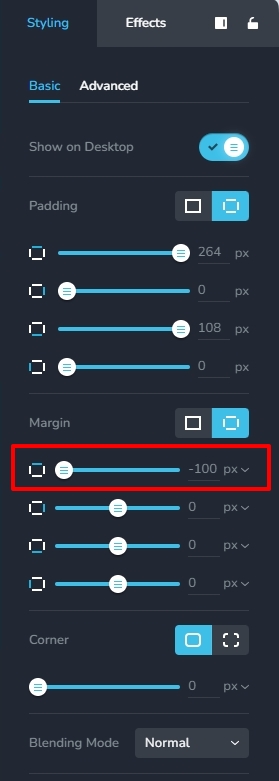
The reason why the header disappeared is because you have applied the negative top margin to the header block. Instead, apply the negative top margin to the hero block. I have done this in your homepage. Kindly add a top margin of -100 px for hero blocks in all other pages.
 0
0 -
Aha! Doh!
Yes it is obvious now you have pointed it out.
Thank you :)
I have got an issue with margin above logo and menu, how do I add. I've tried but get white space.
0 -
Hi Ray,
You did not add the top margin of -100px to the hero blocks in pages other than the homepage. As a result, you were seeing a white space in the header background. I have added a top margin for the hero sections of all the pages. Kindly check.
0 -
Hello
I have followed advice, but have another issue. Not sure if this is a bug or my mistake.
After adjusting the margin of hero section, the hero settings button has disappeared (shown is copy of another section).

Please see my workspace called BRIZY STAFF, project #8.
NB: Please do not post links to my project or show web address in a helper video, than you for your co-operation. The project is copy so any changes are fine.
0 -

Hi Ray,
Thank you for the update and we apologize for the delay.
I have requested a member of our team to look into the issue. I will get back to you as soon as I have an update.
Best regards,
Ariel H.0 -
Any update on why this happened?
0 -
Hi Rey,
I apologize for the delay. I will provide you with a response to this issue in a few minutes.
Best regards,
Ariel H.0 -
Hi Rey,
Thank you for your patience, and I apologize for the delay in resolving this issue.
Upon checking, it was found that -100 px margin was applied to all the four sides of the block, causing the block to go beyond the viewport. As a result, the block properties icon became inaccessible.
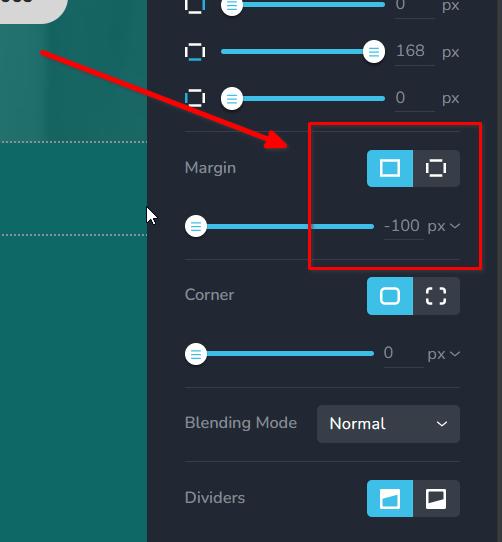
This was fixed by applying the negative margin only at the top of the block, as demonstrated below.
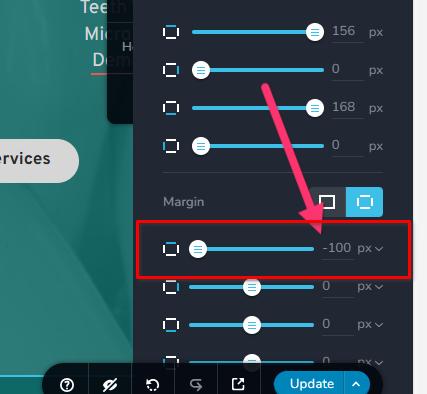
If you have any additional questions, please feel free to ask.
Best regards,
Ariel H.0 -
That's excellent, good to know.
0 -
Hello Brizy
I think I have made the same error with a back to top button, as it has disappeared. If I have deleted it accidentally, I have a backup copy so it is easy to fix.
Please see my workspace called BRIZY STAFF, "test project".
Thx
Ray
NB: Please do not post links to my project or show web address in a helper video, than you for your co-operation. The project is copy so any changes are fine.
0 -
Hi Ray,
I checked your project and cannot see a 'Back To Top' icon anywhere. Kindly import it from your backup. You could also look at this tutorial Brizy scroll to top icon
0 -

is there any other way to make a transparent header? I'm trying to set transparent using blocksy and it doesn't work
0 -
Hello Jacek,
You can setup a transparent header using Blocksy following the procedure at How to Create Transparent Header with Blocksy Theme Have a look at https://brizy.online/ for a page with a transparent header setup using Blocksy.
0 -
I tried that first and the problem is that it doesn't work. I change the options like in the video and nothing happens
0 -
Hello Jacek,
To determine why the transparent header isn't working for you, some troubleshooting is necessary. Have you brought this up with Blocksy Support? This question can also be posted in their Facebook community, at https://www.facebook.com/groups/blocksy.community.
Please contact us again if the Blocksy team is unable to assist. We'll take a look at your WordPress Dashboard to see if we can resolve this problem for you.
0
Please sign in to leave a comment.
Comments
15 comments