pop ups give me error

Hi! When I click popups I get an error. I cant edit or create new popups? see video below:
0
-

Hi
Projects which were developed before February 2021 follow the older Brizy Cloud project format. HUUB was developed using the older project format and unfortunately we do not offer support for older projects.
If you recreate the project in the current project format, the issue could be resolved. Kindly follow the procedure below to recreate the projects in the current Brizy Cloud project format.
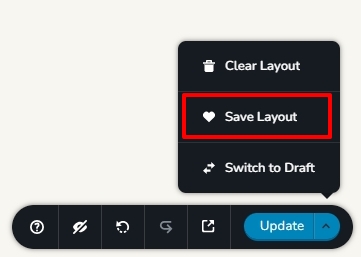
- Save each page as a layout in the old project by selecting the 'Save Layout' option in the bottom right corner.
- Create a new project and add pages one by one and import the page layouts saved in step 1
- Copy paste the global styles and typography from the old to the new project
- Recreate menu, setup global blocks and display conditions
- Re-setup the email notifications for Brizy forms in the new project
- Recreate the popup in the new project
0 - Save each page as a layout in the old project by selecting the 'Save Layout' option in the bottom right corner.
Please sign in to leave a comment.
Comments
1 comment