Website Showing In Editor But Not In Preview or Browser

Hello, my website is fine in the Brizy editor but only half of the page is displaying in the preview or browser. I have cleared cache and tried different browsers as well as ingonito mode but nothing works. Please help.
-

Hi Zakkiyah,
Thank you contacting us.
Could you please provide us a short screencast to demonstrate the issue. This will help us gain a better understanding of the problem and potentially offer a solution.
In the meantime, could you try increasing the current PHP Memory limit to 512M or higher to see if this resolves the issue?
https://www.wpbeginner.com/wp-tutorials/fix-wordpress-memory-exhausted-error-increase-php-memory/Please try this and let me know how it goes.
Best regards,
Ariel H.0 -
Hi Zakkiyah,
Thank you for your cooperation.
Upon checking, it seems that the issue is related to the embedded Google and AppStore code on this page. The presence of closing HTML tags in the code likely caused the truncation of other elements on the page. I made changed by embedding only the necessary tags within the body tag, as demonstrated in this example.
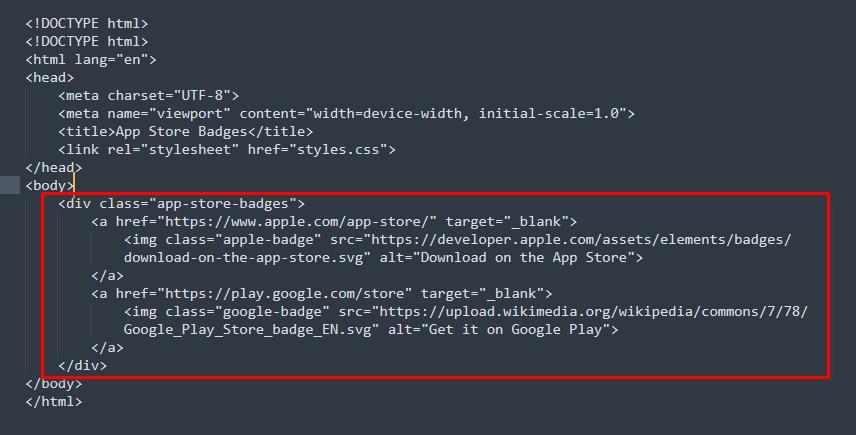
Following this modification, the page rendered correctly as expected.
If you have any additional questions, please do not hesitate to reach out.
Best regards,
Ariel H.0
Please sign in to leave a comment.
Comments
2 comments