Brizy doesn't work on new wp hosting

Hello, I get an error: This page needs a refresh. You've probably updated this page (or another page) in a different tab or browser. I've read guides on how to avoid the error, but none of them work.
This is the website: https://klementhofbauer.online
I can upload posts, but I can't edit the page design. A new page created with brizy design will not be saved. You can't even save the layout of the brizy. This error appeared on a new wordpress hosting. Brizy doesn't work on it on any website. What are the hosting settings for brizy builder to work?
-

Hi Josef,
Thank you for contacting us.
Please try to increase the PHP Memory limit to 512M or higher to see if this resolves the issue. You can refer to this link for guidance: https://www.wpbeginner.com/wp-tutorials/fix-wordpress-memory-exhausted-error-increase-php-memory/
If the problem persists, could you kindly confirm if you can replicate the issue when all other plugins, except for Brizy and Brizy Pro, are disabled? There may be a conflict with another plugin causing this issue. Additionally, it would be helpful if you could try switching to a different theme and see if that resolves the issue.
Please try this and let me know if this helps.
Best regards,
Ariel H.0 -
Hi Ariel, I made the adjustments as per your recommendation:
- I increased the memory to 1024M
- i disabled all plugins except briza and briza pro
- I changed the wordpress theme
Unfortunately, this did not solve the problem.Josef M.0 -
Hi Josef,
Thank you for reaching out to us.
Could you please try flushing the Permalinks and see if this helps?
Instructions are found on this link:
https://wpastra.com/docs/how-to-refresh-wordpress-permalinks/Also try using another browser and see if this makes any difference.
If the issue continues, we kindly request temporary access to your WP Admin details. This will enable us to conduct a thorough investigation. Please add us as an Admin user to your WordPress Dashboard and send the following details to communitysupport@brizy.io:
Community Post link: https://support.brizy.io/hc/en-us/community/posts/19761355465490
WordPress Admin URL:
Username:
Password:As a precaution, please make a full backup of your site.
Best regards,
Ariel H.0 -
Hello. There is the same error in another browser. When I went to the permalink this came up:
for:
https://klementhofbauer.online/wp-admin/options-permalink.php
a message appeared:
500 internal server error:The server encountered an internal error or misconfiguration and was unable to complete your request.
Please contact the server administrator at webmaster@klementhofbauer.online to inform them of the time this error occurred, and the actions you performed just before this error.
More information about this error may be available in the server error log.
I have sent you the login details to the wordpress administration at
communitysupport@brizy.ioJosef M.
0 -
Hi Josef,
Thank you for your cooperation.
Upon checking, even when both Brizy and Brizy Pro are disabled, the error persists when attempting to flush the Permalinks or accessing Site Health.
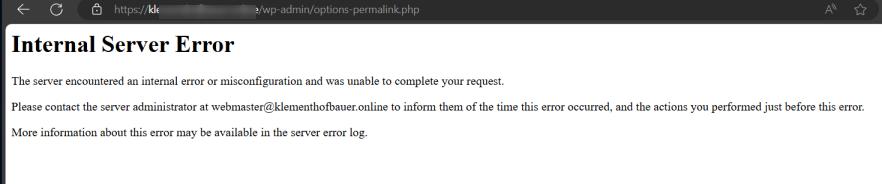
Unfortunately, this issue seems to be more server-related. We recommend reporting this issue to your hosting provider so they can be aware of this issue and possibly offer a solution.
Best regards,
Ariel H.0 -
Ok, thank you very much!
Josef
0
Please sign in to leave a comment.
Comments
6 comments