I Created A Second Brizy Pro Site - Still Cannot Edit

Hello, I messaged earlier about my inability to edit my Brizy Pro site. Friends of mine have tried it from their computer without issue. However, I am still not having any luck. To troubleshoot, I set up a second site and I'm having the same problem. Can you please help?
I have cleared cache. I have tried a different device. I have tried everything!! Nothing happens. The loader continuously spins! I need to get my site launched. I would be grateful for your urgent attention to this matter.r Thank you
-

Hi Zakkiyah,
Thank you for contacting us.
This is something we need to inspect from your WP Admin page. Please add us as an Admin user to your WordPress Dashboard and send the following details to: communitysupport@brizy.io
Community Post link: https://support.brizy.io/hc/en-us/community/posts/19547485896466
WordPress Admin URL:
Username:
Password:Please make a full backup of your site as a precaution.
In the meantime, could you please try disabling all other plugins except for Brizy and Brizy Pro to see if the issue persists? If the issue does not occur with other plugins disabled, it is possible that there may be a conflict with one of the third-party plugins installed on your site. Additionally, you can try temporarily switching to another theme to determine if the issue is related to your current theme.
Best regards,
Ariel H.0 -

Hello Zakkiyah,
I could sign in to one of your websites ReReWrites.com. The homepage opened and I am able to make changes and update the page. Kindly see the screen recording at https://jmp.sh/MwRy8vvL
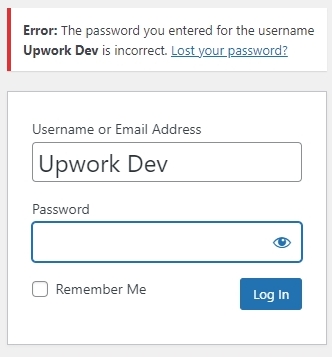
Unfortunately I could not access the other website, Flipameme.com due to incorrect password.
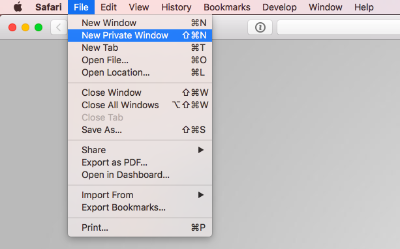
If you are unable to edit Rerewrites.com, kindly follow these steps- Kindly sign in to the WordPress Dashboard from a New Private (incognito) Window of your browser and check if that helps.
- Use an alternate browser to to sign in to your WordPress Dashboard and check if you see the same error.
- If you have installed an antivirus software like AVG, Avast, malware protection software like Malwarebytes, or a firewall, kindly disable such software temporarily and check if the issue persists.
If none of the above helps, kindly get back to us and we will need access to your laptop to troubleshoot this for you.
0 - Kindly sign in to the WordPress Dashboard from a New Private (incognito) Window of your browser and check if that helps.
Please sign in to leave a comment.
Comments
2 comments