SSL invalid

Hello, the SSL certificate for www.autokombi.com is not working. I tried to delete teh domain name and do it again but it does not solve the problem. Can you please help. Thanks
-

Hi Marco,
Apart from the Brizy Cloud A Record, I also see two additional A Records associated with your domain.
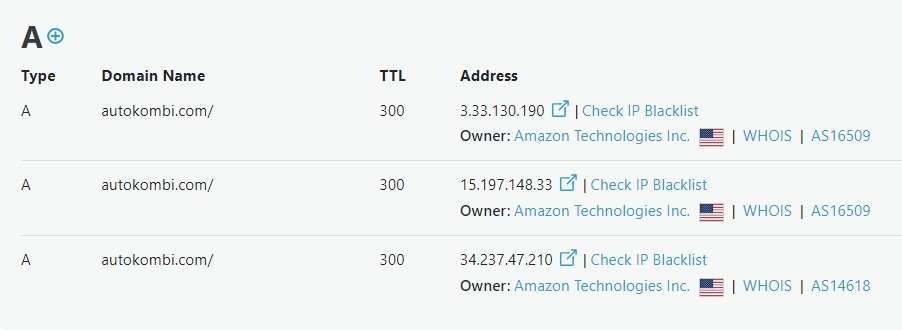
Kindly delete the A Records with these IPs
- 3.33.130.190
- 15.197.148.33
After deleting the additional A Records, kindly delete the custom domain, add it again and wait for 20 minutes to auto generate the SSL certificate.
0 -
Hello, where should I do that within Brizy Cloud?
0 -
Hello Marco,
Your Name Servers are hosted with GoDaddy. Kindly sign into your GoDaddy account and follow the procedure at https://in.godaddy.com/help/delete-dns-records-19210 to delete the A Records with IPs 3.33.130.190 and 15.197.148.33
You could also look at this tutorial for the procedure How To delete A Dns Record GoDaddy After deleting the additional A Records, kindly delete the custom domain, add it again and wait for 20 minutes to auto generate the SSL certificate.
0 -
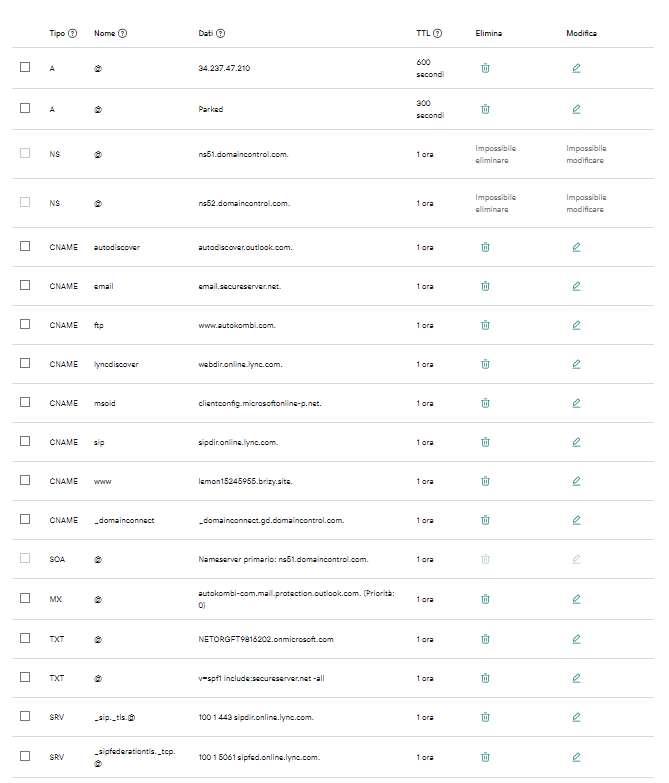
Thank you George. See below, I struggle to find the IPs you are mentioning. There are just 2 A records, one is Brizy's, one is "Parked". No other A records, nor I can find the IPs you are mentioning..
 0
0 -
Hi Marco,
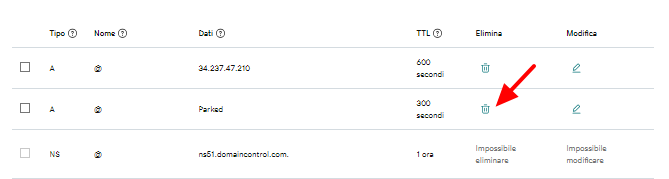
Kindly delete the Parked A Record by clicking on the Trash icon. After deleting the Parked A Record, kindly delete the custom domain, add it again and wait for 20 minutes to auto generate the SSL certificate.
 0
0 -
it works! thanks!
0
Please sign in to leave a comment.
Comments
6 comments