Custom SUBDOMAIN

HELLO
How do I set up a custom subdomain and then redirect to another Hosting Provider? I want to set-up a membership site and I don't believe it is possible with Brizy. I also wish to sell digital products so I would need to setup a second subdomain as it appears the e-commerce function is not available on Brizy.
-

Hi Laine,
To host a subdomain on a different server, you can follow these steps.-
Add an A Record for the subdomain: Sign in to your domain registrar account and add an A record for your subdomain to point to your new server. In the A (Host) group, click Add New A Record, enter the host name, and then enter the IP address of the server you want to point to.
-
Assign the subdomain to your hosting: Log in to your hosting account, select Assign a new domain to your account, create a subdomain, and then add the subdomain name and select the domain.
For more detailed procedure, kindly visit How To Host Sub-Domain On Different Hosting Account If your hosting provider allows more than one domain in a hosting package, this process will work. If not, you might have to add a new hosting plan and provide the subdomain at the time of purchasing a new plan. Please check with your hosting company how they can host a subdomain on their server.0 -
-
Good morning
I must not of explained my self properly. I want to add a subdomain for a domain that is used with a website on brizy cloud. So my hosting provider is Brizy cloud. So how do i add a custom subdomain brizy cloud and then have it hosted on a different server?
0 -
Hi Laine,
The subdomain is added to your domain in your Domain Registrar account and not in Brizy Cloud.
The procedure I have explained above is for creating a subdomain to a domain hosted with Brizy Cloud (Step 1) and then hosting the subdomain with another host (Step 2). Kindly attempt to follow the steps I have outlined above and if you have more questions, please get back to us. The article I have linked above has more details.
if you provide us with the subdomain's details and the hosting company you wish to use, I can give instructions specific to your domain registrar and hosting provider (which would be easier to follow)
0 -
This is stressing me out. I am obviously, not explaining things the right way.
your instruction advise:
Sign in to your domain registrar account and add an A record for your subdomain to point to your new server.I don't have a subdomain name set up, so I rang GoDaddy yesterday and they told me that I would have to contact my hosting provider. That''s why I reached out to you.
So How do I add the A record for a subdomain (not yet created) to point to the new server?
0 -
Hi Laine,
When you rang up GoDaddy they would have noticed that the domain is hosted with Brizy Cloud and would have assumed that the Name Servers are also hosted with Brizy Cloud and hence told you to contact your hosting provider.
Let's say you want to add a subdomain to buzzcreators.com.au. Even though this domain is hosted with Brizy Cloud, the Name Servers are hosted by GoDaddy and hence, you need to add the subdomain in your GoDaddy Domain account.
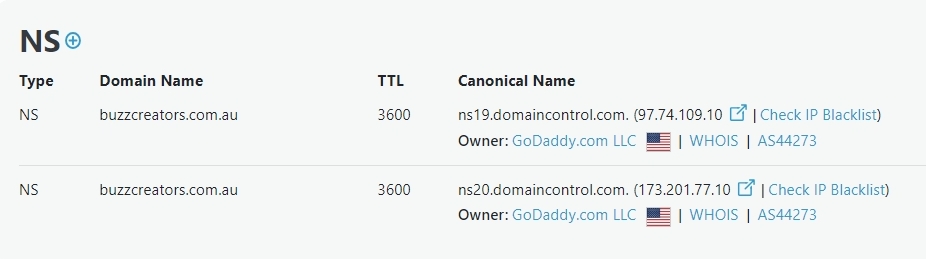
Kindly follow instructions at https://in.godaddy.com/help/add-a-subdomain-4080 to add a subdomain to buzzcreators.com.au. When you reach the fifth step, you will need to add an IP address for the subdomain. This will be the IP address of the hosting server where you wish to host the subdomain.
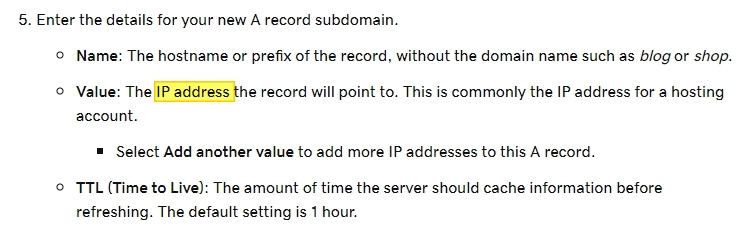
The above steps will complete Step 1 in my earlier instructions above.
You need to proceed to Step 2 which is adding the sub domain to a hosting account. Kindly let us know your hosting provider where you wish to host your sub domain. We will then add further instructions for the specific hosting provider
0
Please sign in to leave a comment.
Comments
5 comments