Suggestion: Header and Footeer Compatibility

Many Popular Page Builder i.e Elementor is popular because it is compatible with WordPress Theme Headers and Footer and Just changes the Body of the Website. Although Elementor has it,s own headers and footers functionality but it,s not compulsory.
Many WordPress users use different page builders on one website, i.e they also use gutenburg page builder on some posts and elementor page builder on some posts without disturbing the layout of theme headers and footers.
But when they come to use Brizy Page Builder then they must have to create brizy headers and footers which not only creates burden of creating header and footer again and it don,t get the same look and feel as previous so many people quit using brizy page builder.
My Suggestion is that brizy should also make brizy compatible with theme headers and footers.just like elementor is offering and getting popular day by day on WordPress so its very important that brizy should not ignore this fact of making brizy more compatible than elementor.
If you agree with my suggestion then vote me up.
Best Regards
-

Hi Zahid,
The feature you have suggested above is already available in Brizy. Although Brizy pages can have Brizy header and footer, it is not mandatory. You can setup a Brizy page using theme header and footer as well.
Brizy supports two different 'Page Templates'
- Brizy Template : The page header, body and the footer are designed in Brizy
- Default Template : The page header and footer are designed in the WordPress theme and only the body is designed using Brizy
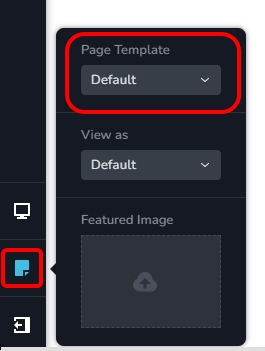
To apply the 'Default Page Template' to your Brizy pages, in the Brizy editor on the left sidebar, select the 'Page' icon and then the 'Default' option under 'Page Template'.
Have a look at https://brizy.tech/ for an a sample website developed using the 'Default Page Template'. The header and the footer in this website are designed using Blocksy theme.
0 -
Yes, But your mentioned feature is only availasble while creataing few pages of the site. Normally WordPress is used for creating blog and thousands of posts are designed in page builders and people are using elementor due to it's compatibility in the posts of the blog.
Brizy is lacking behind in compatibility of designing posts with theme headers and footers which is a major poart of blogging and People don,t want the difference in the styles of headers and footers between pages and posts because websites prefer similarity throughout the website and brizy is not able to provide that similarity between pages and posts.
If you think that my suggestion will make a difference then vote it up.
Best Regards
0 -
Hi Zahid,
In Brizy, you can apply the 'Default Page Template' to all your blog posts as well. Kindly open the Brizy Blog Post template and select the 'Default Page Template'. For instance, all blog posts listed at https://brizy.tech/blog/ are developed using the 'Default Page Template'
0
Please sign in to leave a comment.
Comments
3 comments