Issues afyer updating plugin

Hi,
I am always reluctant to update the plugin particuarly as it is a two part process - free then the pro plugin. And each time I seem to have isssues, tis time no exception.
I currently have Brizy Version 2.4.25 and Brizy Pro Version v 2.4.23 (both the latest at that time).
My intention was to first update the Brizy free plugin to 2.4.44 and the Brizy pro to v 2.4.38.
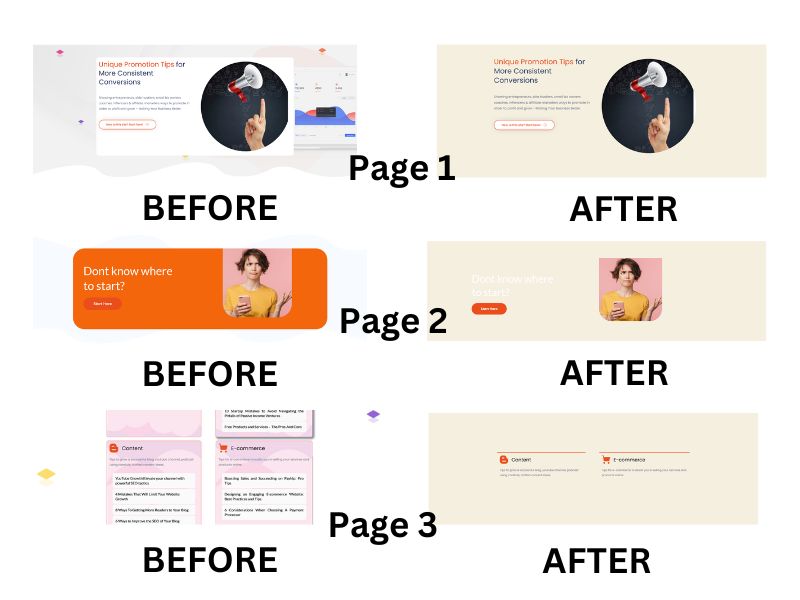
However I updated Brizy free to 2.4.44 and instantly notice that ALL my pages had changed their colours and styles. I have attached before and after images for three of my pages to demonstrate this elow.
Fortunately once I ued the WP Rollback pugin and returned to Version 2.4.25 my website returned back to its original state.
Why has this happened and how can I can avoid this happening when I upgrade?
I dont believe everytime I update my website I shuld be forced to go back through the desgn of all my pages. To be honest I spotted this but what other isssues await?
Kind regards
Wayne
-

Hi Wayne,
Thank you for contacting us.
This issue often occurs due to caching. For updates to run smoothly, I suggest disabling all plugins except Brizy and Brizy Pro. It's also advised to clear server-side cache, such as SiteGround cache if your site is hosted by SiteGround. After doing so, proceed with updating Brizy and Brizy Pro.
After the update, first enable any cache plugins and purge all cache, then enable the rest of the plugins.
Please try this and let me know if this helps.
Best regards,
Ariel H.0
Please sign in to leave a comment.
Comments
1 comment