Mobile

Hello:
I have two questions relating to mobile views.
1. How can I get a video to play on mobile view? It works fine on desktop and is a video that I have uploaded to the gallery on my site.
2. Is it possible to reorder blocks that would apply only to the mobile view? I want to move a small gallery higher up on mobile only as it is fine on the desktop and tablet.
Thanks!
Jim
-

Hi Jim,
Thank you for contacting us.
If you have used a video as a background, please add the following custom CSS in the WordPress Customizer under "Additional CSS":
.brz-bg-video { display: block!important; }Unfortunately, reordering blocks in mobile view is not currently possible. We apologize for any inconvenience caused.
If you have any further questions, please let us know.
Best regards,
Ariel H.0 -
Hi Ariel:
First, thank you for the direction about adding the CSS. It has worked and that is great.
However, a couple of questions please.
1. If you go to .c******ng.com the video plays but, when you go to tablet or mobile view it does play but, we have built in a play button that leads to a pop up that should also play the video (in a bit of a larger size) and when you click the play arrow, the pop out works but then cannot play the video. Any idea how to make it work this way?
2. If you go to sm*****h.ca/ and in mobile view and click the contact link, the contact page opens but, the hamburger menu is no longer functional. Would you know why that is and how we can fix it?
With thanks,
Jim0 -
Hi Jim,
Thank you for the update.
About cl******ng.com, I would like to check this in your WP Dashboard. Could you please share your credentials so we can take a closer look? Please send the following information to communitysupport@brizy.io in the following format:
Reference number: 19094483655186
WordPress Admin URL:
Username:
Password:Please make a full backup of your site as a precaution.
About sm*****h.ca, it's possible that something is covering it in mobile view, could you please try raising the z-index value of your navigation menu, you can do this in desktop view as shown on this example.
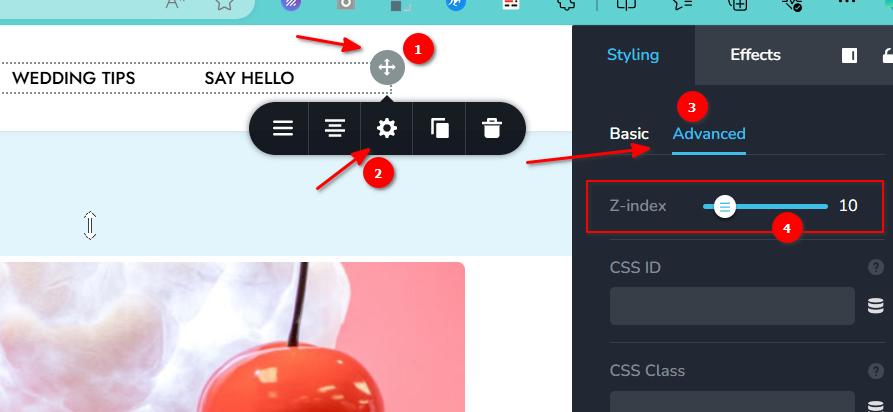
Increasing the z-index will ensure that the menu is on top of all other elements in the header area.
Please try this and let me know how it goes.
Best regards,
Ariel H.0 -
Hi Jim,
Thank you for your cooperation.
I attempted to access your site using the details you provided, but unfortunately, they didn't work.
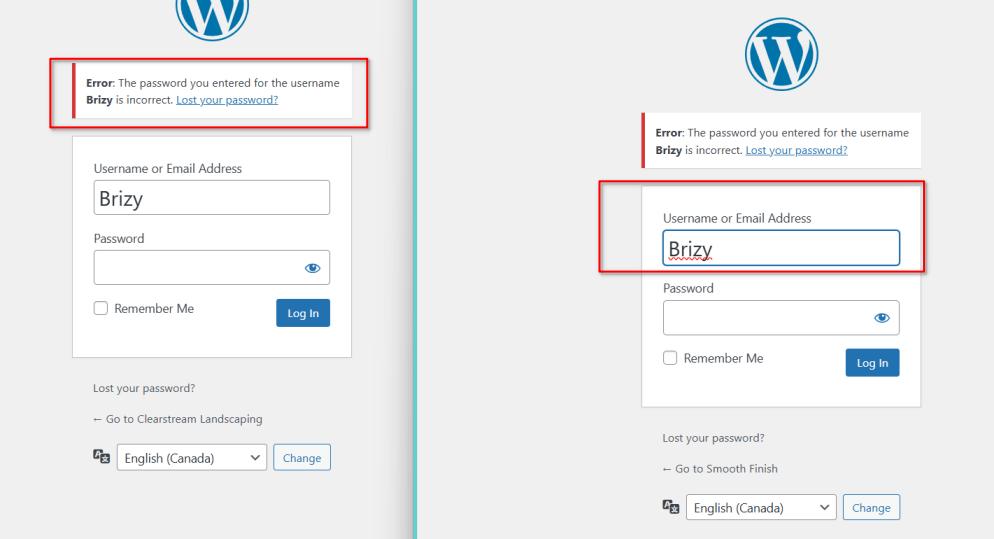
I made sure to copy them exactly as you sent. Could you kindly review and resend them?Best regards,
Ariel H.0 -
Hi Jim,
Thank you for the update.
Upon checking, the video plays when the Speed Optimizer plugin is disabled. There could be some settings in this plugin that conflict with Brizy. The same issue occurs on your second website; when the plugin is disabled, the hamburger menu works normally.
The Speed Optimizer plugin is currently disabled on both websites, so you can try it on your end.
I suggest tweaking the settings to see if you can identify the option causing the issue. Otherwise, report this to the developers of the plugin so they can be aware of the issue and possibly offer a solution.
If you have any further questions, please let us know.Best regards,
Ariel H.0 -
Thanks for finding the problem and solution. Much appreciated and will take it from here.
Best!
Jim0
Please sign in to leave a comment.
Comments
6 comments