Fixed background image on scroll

Hi, I would like a background image to remain fixed as the user scrolls down the page like my prototype
How can I do this with Brizy having multiple blocks on the page?
Thanks
-

Hi Adam,
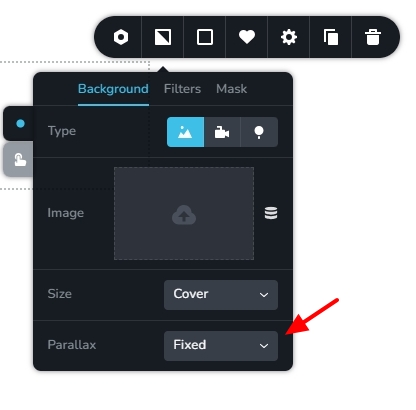
To implement the above design, please add your entire page design as part of a single Brizy block (section). Add a background image to the block and apply the fixed parallax effect. Kindly have a look at https://brizy.tech/fixed-background/
 0
0 -
Ah ok that makes sense. But how will this work with blocks that are global? I don't want all content in one block as it's not efficient. Is there another way please?
0 -
Hi Adam,
To extent the background image to the top of the page behind the header, kindly add a spacer element at the top the page and apply a top negative margin. Similarly to extend the background image to the bottom of the page behind the footer, add a spacer element at the bottom of the page and then add a negative bottom margin. Kindly watch this screen recording. https://jmp.sh/YKSx6nhL The page would look like this https://brizy.tech/fixed-background/
In between "Our Projects" and the "Your Vision, Our Expertise" add a spacer element to give the impression of content within two different blocks.0 -
Thanks for your video george, very helpful.
It would be great in the future if brizy had the option to add a background image to say the <body> element and therefore behind other blocks on the page. This would be particularly useful when you want to use global blocks. Hope that makes sense.
Thanks
0 -
Hi Adam,
Kindly add your suggestion for a site wide background image at https://www.brizy.io/ideas-and-roadmap Other will be able to express their interest in this feature.
0
Please sign in to leave a comment.
Comments
5 comments