Tablet version don't work like desktop and mobile

Hi,
I created a page (https://scuola-borsa.it/prova-provvedimenti/) where you can view the posts in a table-like order with custom fields. Since the content is very long, using the css written below I made it so that you can scroll horizontally without cutting the content. After various adjustments I was able to see it right from desktop and mobile but from tablet it doesn't want to extend the container and it seems like it necessarily wants to put a second column limiting the extension of the first, can you help me understand how to make it work also from tablet? if needed i can provide wordpress credential, for me if there is a option to not show tablet version and show instead mobile version is good too i think, Thank you
.over {
width: 100% !important;
height: auto;
overflow-x: auto !important;
overflow-y: hidden !important;
}
.lungo {
width:170% !important; /* Larghezza maggiore del contenitore */
white-space: nowrap !important; /* Evita interruzioni di linea */
}
.lungo2 {
border:1px solid black;
width:170% !important; /* Larghezza maggiore del contenitore */
white-space: nowrap !important; /* Evita interruzioni di linea */
}
.overmobile {
width: 100% !important;
height: auto;
overflow-x: auto !important;
overflow-y: hidden !important;
}
.lungomobile {
width:250% !important; /* Larghezza maggiore del contenitore */
white-space: nowrap !important; /* Evita interruzioni di linea */
}
.lungo2mobile {
border:1px solid black;
width:250% !important; /* Larghezza maggiore del contenitore */
white-space: nowrap !important; /* Evita interruzioni di linea */
}
.overtablet {
width: 100% !important;
height: auto;
overflow-x: auto !important;
overflow-y: hidden !important;
}
.lungtablet {
width:250% !important; /* Larghezza maggiore del contenitore */
white-space: nowrap !important; /* Evita interruzioni di linea */
}
.lungo2tablet {
border:1px solid black;
width:250% !important; /* Larghezza maggiore del contenitore */
white-space: nowrap !important; /* Evita interruzioni di linea */
}
-

Hi Carlo,
Kindly elaborate on the context of your question.
- Which Brizy element are you using to create the table?
- Are you displaying blog post custom fields in the table?
- How are you displaying dynamic content in the table?
- If we were to replicate the above issue on our end, what steps should we follow?
If possible make a screen recording so that we can understand the context of your question better.
0 -
I use the "Articles" element in the "single" section of the Brizy menu and insert the custom fields using the ACF plugin to create the field, the problem is not the data but basically I created a row for the titles and one (articles) where precisely the content is displayed which I then "align" vertically to the corresponding title, however I need these two "lines" to exceed the width of the screen so as not to have content on too many lines and with titles that wrap badly, this is done using the written code in the first post, I managed to make it work for desktop and mobile but on tablet it doesn't want to "extend" the rows even if the space is created, it's as if it necessarily wants to have two columns instead of just one and this therefore means that the first (and in theory a single column) is "wide" only half the space that I said it must have with the css, i make two video (frontside and backside) hope you understand better the problem https://youtu.be/mq6csAWslyc https://youtu.be/1JqQG1pfG6Q
0 -

Hi Carlo,
Thank you for the update.
It seems that you're attempting to modify the behavior of the dynamic elements. In order to address this issue, we will need to escalate it to one of our colleagues who may be able to provide a solution for you.
Please add us as an Admin user to your WordPress Dashboard and send the following details to: communitysupport@brizy.io
Community Post link: https://support.brizy.io/hc/en-us/community/posts/19036681175186
WordPress Admin URL:
Username:
Password:Please make a full backup of your site as a precaution.
Best regards,
Ariel H.0 -
Hi Carlo,
Thank you for your cooperation.
I've made a private ticket for this issue and escalated it to one of my colleagues. You should receive a notification about it soon.
Best regards,
Ariel H.0 -
Hi, I don't receive any mail from you, you send it?
0 -
Hi Carlo,
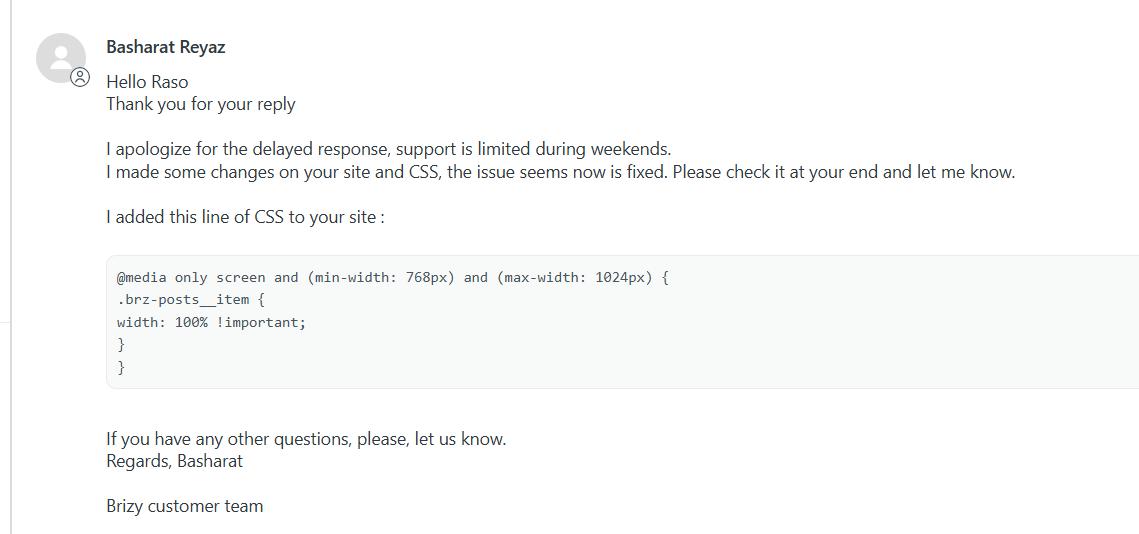
This is his message on the 27th.
 0
0
Please sign in to leave a comment.
Comments
6 comments