Load Issue

A vital fix for professionalism
Before you go to www.deer.network/golden-portal
Tell me if it loads "Deer Network" in gold with a white background for a split second before the correct page loads.
Is there any way we can get this fixed?
I swear Ive had the run around with yall on this and all I need is that text to load last.
There has GOT to be a css or something that makes the text load last so I can have something professional.
Thank you so much
Marcus
-

Hi Marcus,
Thank you for reaching out to us.
I have recorded a screencast to demonstrate how your website looks like on my end. In the video, you will notice that the "Deer Network" does not load in gold with a white background for a split second before the correct page loads, as described.
If this does not accurately address the issue you are facing, kindly provide the steps to reproduce it so that I can further assist you.
Best regards,
Ariel H.0 -
https://www.youtube.com/watch?v=CH8sOCF_aUw
I wouldn't spend much time with this business haha
1 -

Hi Marcus,
I am unable to replicate the white background that loads before the black background. Have a look at my test at https://jmp.sh/TpUujG02
Kindly check if you can replicate the issue on multiple computers/ laptops / devices
0 -
Click my link, the issue is apparent on some computers as you can see.
How would one resolve this issue that comes up on some computers?
It might be cached at your location? It's still happening on mine
0 -
Hi Marcus,
The reason for this could the delay in downloading these two images
- https://deer.network/wp-content/uploads/2024/03/Small-Header.png
- https://deer.network/wp-content/uploads/2023/05/Copy-of-Elemental-Background-1.png
Try applying a mild black background to the hero block to provide background color while these images take time to download
0 -
Right, but the background shouldnt be the issue if it is required for the art of the project.
What I need is a code that make brizy load the font last.
A simple CSS I know exists because I had it at one time before I lost my work.
Would you know of this or where to find this?
Thank you
The preloader I put on to avoid the issue which its still having apparently.
0 -
Hi Marcus,
Please try the following CSS:
@keyframes fadeIn {
  0% {
    opacity: 0;
  }
  100% {
    opacity: 1;
  }
}

p.brz-text-lg-center {
  opacity: 0;
  animation: fadeIn 2s ease-in-out 1s forwards;
}
This CSS will make the font start with an opacity of 0, then after a 1-second delay, it will gradually fade in over 2 seconds.
To add this CSS, go to Appearance > Customize. This will open the WordPress Customizer interface. In the Additional CSS panel, paste the above CSS code.
Best regards,
Ariel H.0 -
still having the issue.
Can we see if we can get this fixed?
Thank you
www.deer.network/golden-portal
(see font not loading correctly for the first .5-1.5 seconds)
0 -
Hi Marcus,
Thank you for staying in touch.
Here is how your site appears on my end: https://youtu.be/bOMBaAShq-8
Could you please try loading it in Incognito Mode or using another browser and create a screencast to demonstrate the issue?
Best regards,
Ariel H.0 -
Hi Ariel
Yes that half second mishap on the load could cost me many thousands as it isn't professional at all.
What else could we try to get this fixed?
Thank you
0 -
Hi Marcus,
Thank you for the update.
Upon checking, the GTmetrix waterfall results show that the images on your website take 9.1 seconds to fully load, which can significantly impact user experience and overall site performance.
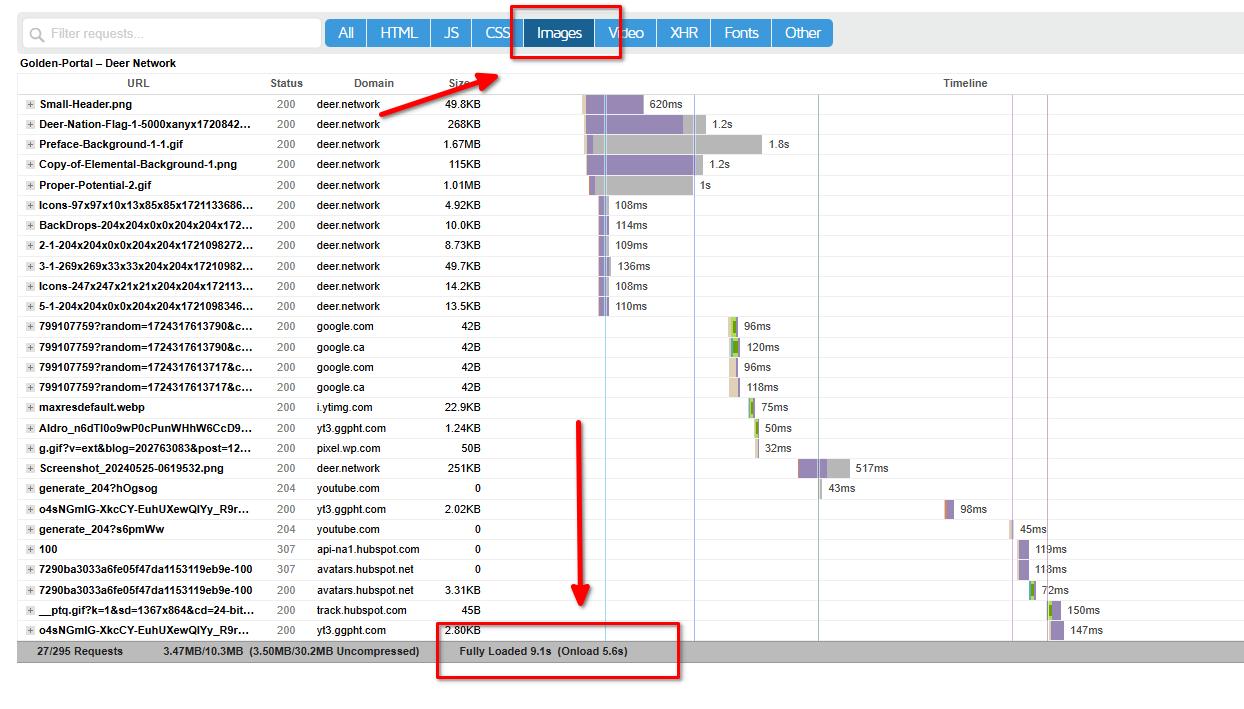
To improve this, we recommend optimizing your images. Instead of using the PNG format, consider using an optimization plugin to convert them into WebP or AVIF format. You can refer to this guide: https://imagify.io/blog/best-webp-plugins/
Another suggestion is to use a Content Delivery Network (CDN) to reduce latency and improve the speed of your website. Here’s a useful resource: https://www.hostinger.com/tutorials/wordpress-cdn
I hope this helps.
Best regards,
Ariel H.0

Please sign in to leave a comment.
Comments
11 comments