Heading tags not showing in html

Hi, how can I change the H1 titles from a homepage designed with brizy builder? I detected I have 3 H1's and that's no good. The page is in a multisite enviroment.Thanks!
0
-

Hi Victor,
By default when applying the Heading 1 typography to a text, the H1 HTML tag is assigned to it. To change the H1 heading tag on your Brizy homepage, kindly apply a typography other than Heading 1 to your text. For example, to apply H2 tag, apply Heading 2 typography to your text.
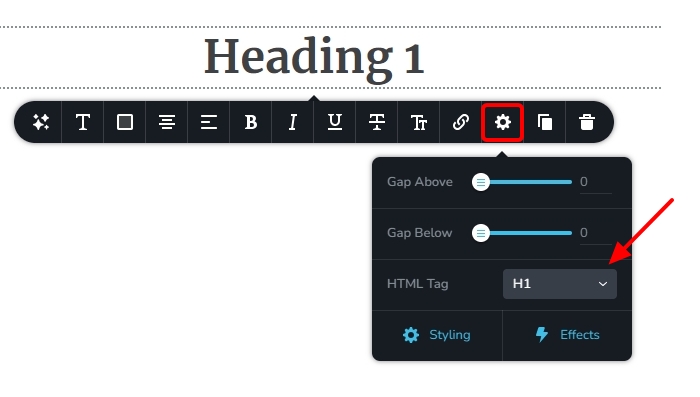
You can assign an HTML tag independent of the typography by selecting the 'cog' icon and then selecting the appropriate HTML tag in the Typography toolbar.
 0
0 -
Thanks George! That was pretty straightforward, guess need to explore a little more
0
Please sign in to leave a comment.
Comments
2 comments