Heading Text does not preserve formatting when made a hyperlink in Posts

For some reason the Heading within the body of this Blog Post is changing size when hovering with the mouse cursor over the body area of the post. This has happened before and your support has provided CSS to fix the issue, but it keeps happening and I don't understand why.
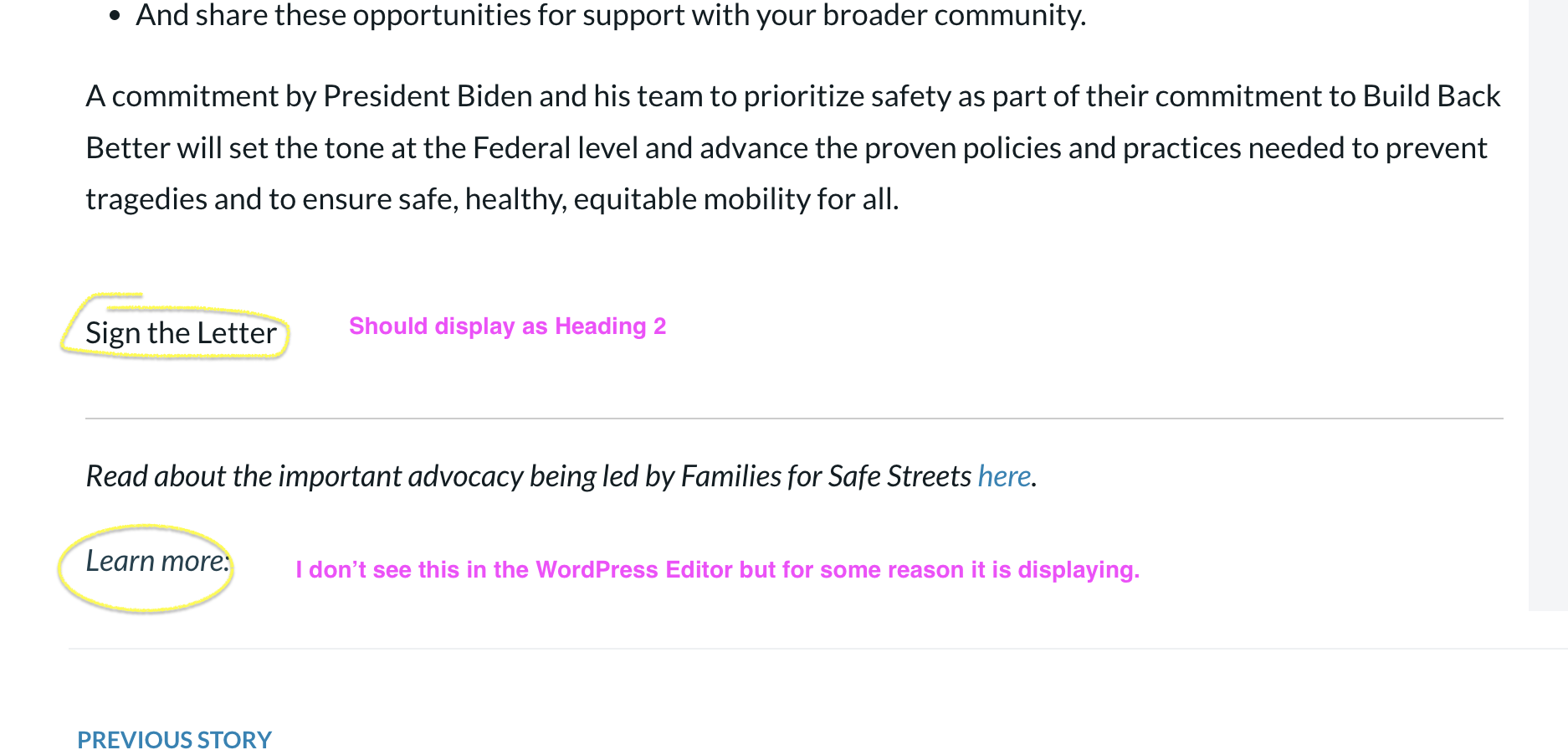
In addition, several of the Heading tags are not being applied, specifically on the "Sign the Letter" text where I have applied Heading 3, but it displays as regular formatted text.
See the issues at this URL as well as video and screenshots I have provided.
Video of the Hover issue: https://drive.google.com/file/d/1Wh6SPQaZrLxnBYuJhFdAYo3-apkO_syb/view?usp=sharing
Screenshow below:
-
As a follow up, I figured out that for some reason the Hover issue was occurring because the Heading 2 text was also given <b> tags to make it bold. I removed that and fixed. I still cannot explain the other issue of the "Sign the Letter" hyperlink not accepting the Heading 2 styling.
0 -
Sorry for multiple messages. It seems that by making the Heading tag text have a hyperlink, it breaks the formatting. I don't want this to happen. I would like the ability to make Headings in my Post content have hyperlinks. Can you please advise how to fix this issue? It seems the <a> link formatting is somehow overriding the Heading styling. I don't know why this is. I have never had so many issues with Typography as I have with Brizy. Please help.
To save you time, I can provide user credentials but I don't want them to be posted publicly in the Support forum.
0 -

Hi Eric,
Thank you for contacting us.
It appears the issue is due to a conflict with SiteGround Optimizer. To effectively troubleshoot and identify the problem, I suggest creating a separate staging environment.
https://world.siteground.com/tutorials/staging/In the staging environment, please disable all plugins except for Brizy and Brizy Pro. Also, it would be helpful to remove any custom CSS and verify if the fonts are correctly applied on both the backend and frontend.
If these steps don't resolve the issue, please provide us with the credentials for the staging site. You can send the credentials to communitysupport@brizy.io and include the reference number 18930027961234 in the subject line. This will enable us to investigate further.
Best regards,
Ariel H.0 -
Hi Ariel,
I am sorry but I don't think you are correct. I disabled the Speed Optimizer plugin and it's still an issue. It seems to only be related to Heading text that is given a Hyperlink. Additionally, nothing in our Custom CSS indicates that a Hyperlink should be a certain font size, so I don't know why removing our custom CSS would fix the issue. However, I did try removing our custom CSS and purging any cache, and I am still seeing the issue on an Post that the Heading text (H1, H2, H3 H4, H5, H6) when given a hyperlink, it will make it display as regular text. See the example below. The text for "Sign the Letter" is a Heading hyperlink and not displaying with the styling of the Heading tag it is assigned. I will send login credentials to the email you provided so you may review the issue.
0 -
Hi Eric,
Thank you for your cooperation.
I've made a screencast for you explaining the issue - https://youtu.be/1ZcjnO5hzIc
I will report the issue regarding the font size reduction when links are added to H tags to our developers for further review. I will keep you informed and provide an update as soon as possible.
Best regards,
Ariel H.0 -
Thanks for reviewing that. I had actually edited the comments above as I figured out where the "Learn More" text was coming from. Question on that. Is possible to hide this dynamic text elements when no tags exist? Basically, we want it to display when there are additional tags (topics) for people to click on. But if there are no tags on a Post, then we would want the "Learn more: tag, tag, etc." to be hidden since there aren't any tags to show.
Thank you for submitting this bug. Another member of your support team seems to have provided a work around for now, which is using a Text block from Brizy builder and then using the #PostContent dynamic tag to pull in the post content, rather than using the Post Content block from the Brizy builder.
0
Please sign in to leave a comment.
Comments
6 comments