SEO issues and beyond

RankMath plugin and Brizy with regards Alt tags
The RankMath SEO plugin allows WordPress users to automate the alt tag generation so the website is always SEO optimized (in this regard) and Accessible for the visually impaired.
However, the way RankMath works, is it takes the name of the file upon importing into the media folder and repurposes it as the alt tag on the front end.
The problem we are having is that when an image is imported into the media folder (WP) when integrated using brizy (fwiw- our whitelabel solution is called pixli) , that media file gets renamed as ?pixli media=wp 2a0b3ce0936c1da5ba7810dc55a33972
And this is what is pulled through as the alt tag for that image on the front end.
Is there another/better way to do this without having to manually update every single image's alt tag? We are converting a handful of clients' sites over to Pixli and are hoping to avoid this 'unnecessary' lift!
Also, the H tags.
When going off the proverbial Brand 'map' to convert an H tag to a different size, font etc. the selected H tag changes to 'custom'. But, from an SEO perspective, when analyzing the HTML code, the h element is replaced with a span element. While the appearance on the front-end is not impacted, the Accessibility score most definitely IS. The H elements are used for both SEO and Accessibility and are integral. Is there not a way to keep the H tag selected AND customize the font? Sometimes you need a smaller font-size but from a hierarchical perspective the appropriate H element to use has global styling that is inappropriate from the UI space. BUT the hierarchy of these elements is informative to both the bots who are crawling and indexing the site and to the screenreaders that are helping improve the accessibility of a site for the visually impaired.
-

Hi Daniel,
Thank you for reaching out to us.
Unfortunately, Brizy doesn't have a feature to manage Alt Tags for images. You'll need to manually update the alt tags for each image in the media library to optimize them for SEO and accessibility. You can do this directly in the media library or use a plugin like Media File Renamer.
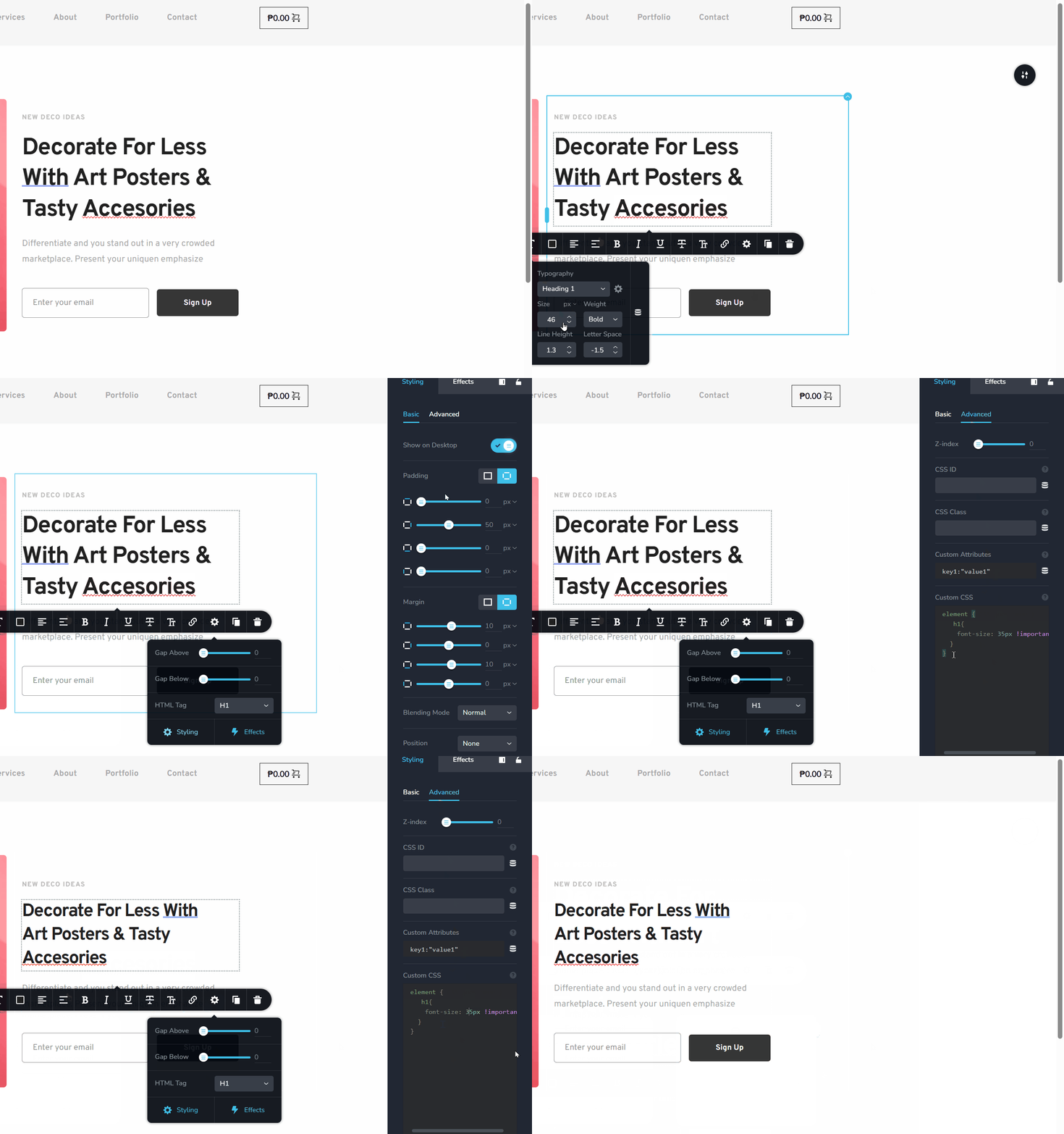
About the H tags, maintaining the hierarchy and semantic structure of HTML elements is essential for SEO and accessibility. If you need a smaller font size but want to preserve the hierarchy, you can use CSS to style the H tags without altering their semantic meaning. This ensures search engines and screen readers interpret the content correctly.
If you have any further questions, please let us know.Best regards,
Ariel H.0
Please sign in to leave a comment.
Comments
1 comment