billing changes

Hi, I hereby kindly ask you to modify the following invoice: 2DC452B7 6314
1) VAT is Italian and not Hungarian
2) if it is possible to enter the amount in euros and not in dollars
3) the address must be
VIMA CLEAN S.r.l.s.
VIA SALICE
84018 - SCAFATI
ITALY
mail:vimacleansrls@gmail.com
0
-

Hi Marco,
To make changes to your billing information, kindly follow these steps. To protect the privacy of your personal information, feel free to delete this post once you have generated a revised invoice.
- Sign into your Brizy account at https://www.brizy.io/account/login
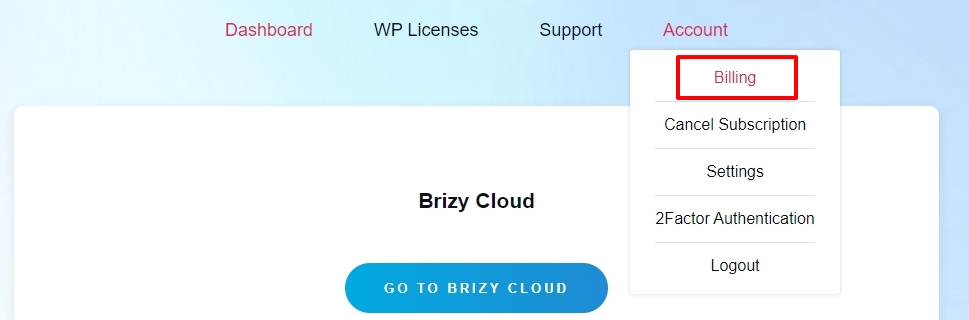
- Select the 'Billing' option under Account
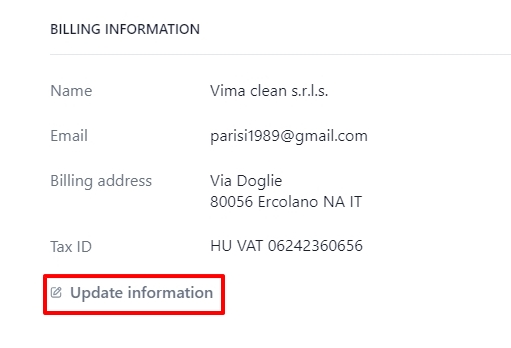
- In the Stripe page that follows, under the heading "Billing Information", select the "Update information" link to update your billing info.
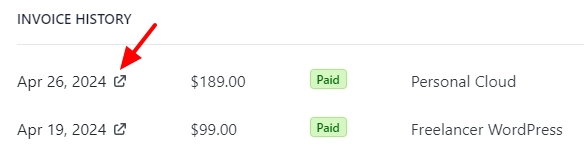
- Under the heading "Invoice History" click on the invoice date to view and download the revised invoice
0
Please sign in to leave a comment.
Comments
1 comment