How to Apply Brizy Global Styling to ACF Fields?

Hi,
I'm building a larger site using a lot of ACF data fields, including the ACF WYSIWYG Editor field.
When I pull in the ACF WYSIWYG field into my Brizy Templates using the # method, the content from the ACF WYSIWYG fields populates insides the Brizy template correctly, BUT the H1, H2, H3, etc. are not the Brizy Global Styling for Headers - instead the ACF WYSIWYG content use the ACF Header styling. I need to apply the Global Brizy Header styling to the ACF WYSIWYG Header content.
Question 1
- How do I apply the Global Brizy Header Styling to headers from an ACF WYSIWYG content field?
Question 2 & 3
If Brizy by default can't apply its global styling to the ACF WYSIWYG Header content, then I want to make a custom code or CSS that mirror the Global Brizy Header styling and apply it to the ACF WYSIWYG header content.
- Where can I find the CSS for the Global Brizy Header Styling?
- And how do I replicate and mirror that over to the ACF WYSIWYG Headers?
I look forward to hearing from you.
Best,
Daniel
-

Hi Daniel,
Brizy does not have a feature to stylize the ACF WYSIWYG content using Brizy's global typography settings. However if ACF dynamic fields are being applied to blog posts and you are adding content using the Gutenberg editor and have applied content typographies in Gutenberg, you can map Gutenberg typographies to Brizy typographies using the Brizy 'Content' element.
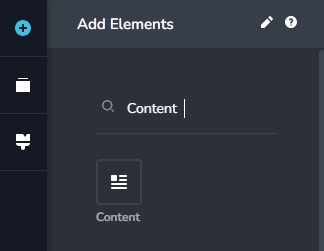
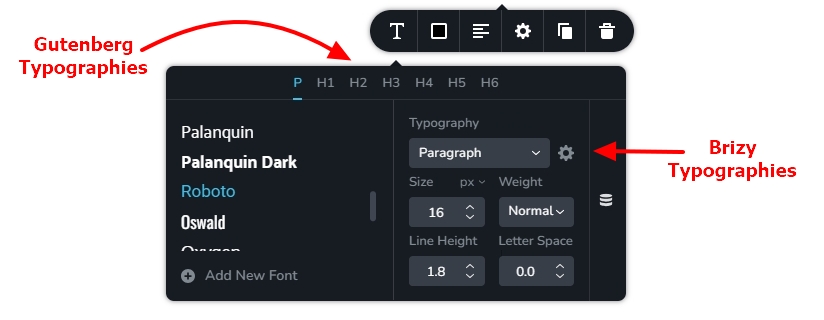
This would be the best way to apply Brizy typographies to your content. Would this be a feasible solution for your project?
0 -
Hi KC,
OK, and thank you for the response and potential solution.
I do not use the Gutenberg Blocks, I use solely the Brizy Builder and ACF for the entire site. Since it's only the Headers (H2 and H3 specifically) I need to style, I found a suitable solution by including "Additional CSS" in my them file (Blocksy theme).
I used the code below and it works perfectly :)
Thanks,
Daniel----- Additional Theme CSS ---- Header styling and YouTube video aspect ratio control
/* ACF WYSIWYG Editor H2 and H3 Override - Base styles for H2 and H3, applied at all sizes and overridden as necessary */
h2, h3 {
font-family: 'Montserrat', sans-serif; /* Setting Montserrat as the font for all H2 and H3 */
color: #142850; /* Common font color for all headers */
line-height: 1.3; /* Common line height for all headers */
}/* Desktop Styles (992px and above) */
@media (min-width: 992px) {
h2 {
font-size: 42px;
font-weight: bold;
letter-spacing: -1.5px;
}
h3 {
font-size: 32px;
font-weight: 600; /* Semi-bold is often represented as 600 weight */
letter-spacing: -1.0px;
}
}/* Tablet Styles (768px to 991px) */
@media (min-width: 768px) and (max-width: 991px) {
h2 {
font-size: 35px;
font-weight: bold;
letter-spacing: -0.5px;
}
h3 {
font-size: 27px;
font-weight: 600; /* Semi-bold is often represented as 600 weight */
letter-spacing: 0.0px;
}
}/* Mobile Styles (0px to 767px) */
@media (max-width: 767px) {
h2 {
font-size: 29px;
font-weight: bold;
letter-spacing: -0.5px;
}
h3 {
font-size: 22px;
font-weight: 600; /* Semi-bold is often represented as 600 weight */
letter-spacing: 0.0px;
}
}/* ACF WYSIWYG Editor YouTube full width */
iframe {
aspect-ratio: 16 / 9; /* Sets the aspect ratio to 16:9 */
width: 100%; /* Make the iframe take the full width of its container */
height: auto; /* Optional: Adjust this depending on your needs */
border: none; /* Optional: Removes the border around iframes */
}0
Please sign in to leave a comment.
Comments
2 comments