adjusting the speed of the entrance animation of the hamburger menu for mobile devices

Hello Support Team,
I have a question regarding adjusting the speed of the entrance animation of the hamburger menu for mobile devices - only Brizy WP. In the settings of the menu element, only the hamburger element is animated, but not the entire menu. Could you please explain how to adjust the speed of the entrance animation for the entire menu?
Please Check vana-friseursalon.de - no speed control?
Thank you in advance.
-

Hi
There is no option to customize the speed at which the side menu drawer opens when a mobile user selects the hamburger icon in the Brizy Menu element; it opens swiftly. However, if you setup your hamburger menu using the Brizy popup builder, you can customize the speed of the menu's entrance animation. Kindly look at the hamburger menu setup using the popup builder at https://www.rishikeshwalks.in/
Have a look at the first part of this tutorial for the procedure to setup a hamburger menu using the Brizy Popup builder 3 Ways to Use Popup Builders: Website Navigation, Back to Top Button, Deals or Cookie Notification
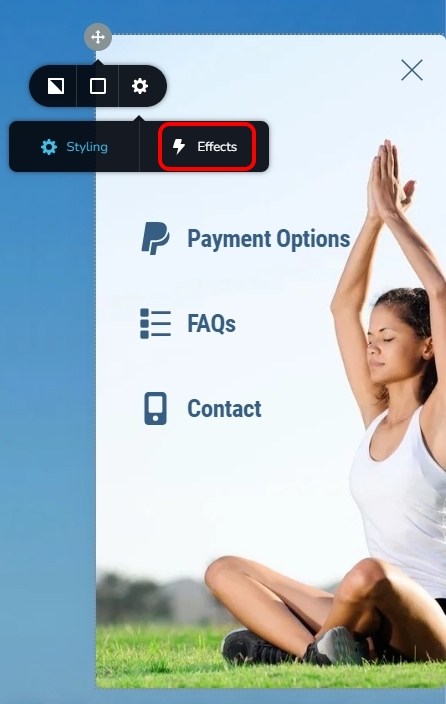
Once you setup the hamburger menu, add the entrance animation to the menu by selecting the 'Effects' option of the menu container.
 0
0 -
Thank you for the information, which is very helpful. However, I would like to mention that when a mobile user selects the hamburger icon in the Brizy Menu element, it now opens not swiftly but immediately. Could this be a bug? Please check my site https://vana-friseursalon.de. Thank you.
0 -
Hi
You are right; the hamburger menu on mobiles open abruptly. You can see the same behavior at https://www.brizy.io/
The built-in hamburger menu does not give you an option to customize the speed of opening the side menu drawer. It is a limitation of the current design rather than a bug. Hence, the only solution is to recreate the hamburger menu using the popup builder.
0
Please sign in to leave a comment.
Comments
3 comments