Error in navigation after plugin update

Hi there.
it appears that the website is throwing an error when trying to load the nav menu. This happened after the Brizy Pro plugin automatically updated. it only sometimes fails to load and others it works ok. Was there a bug reported or what could be the issue? The site not loading the CSS or content or the hosting blocking something?
Please help.
Thanks,
Eric (on behalf of my client Nick Ferry
PS Please include my email in your response
eric@iversionmedia.net 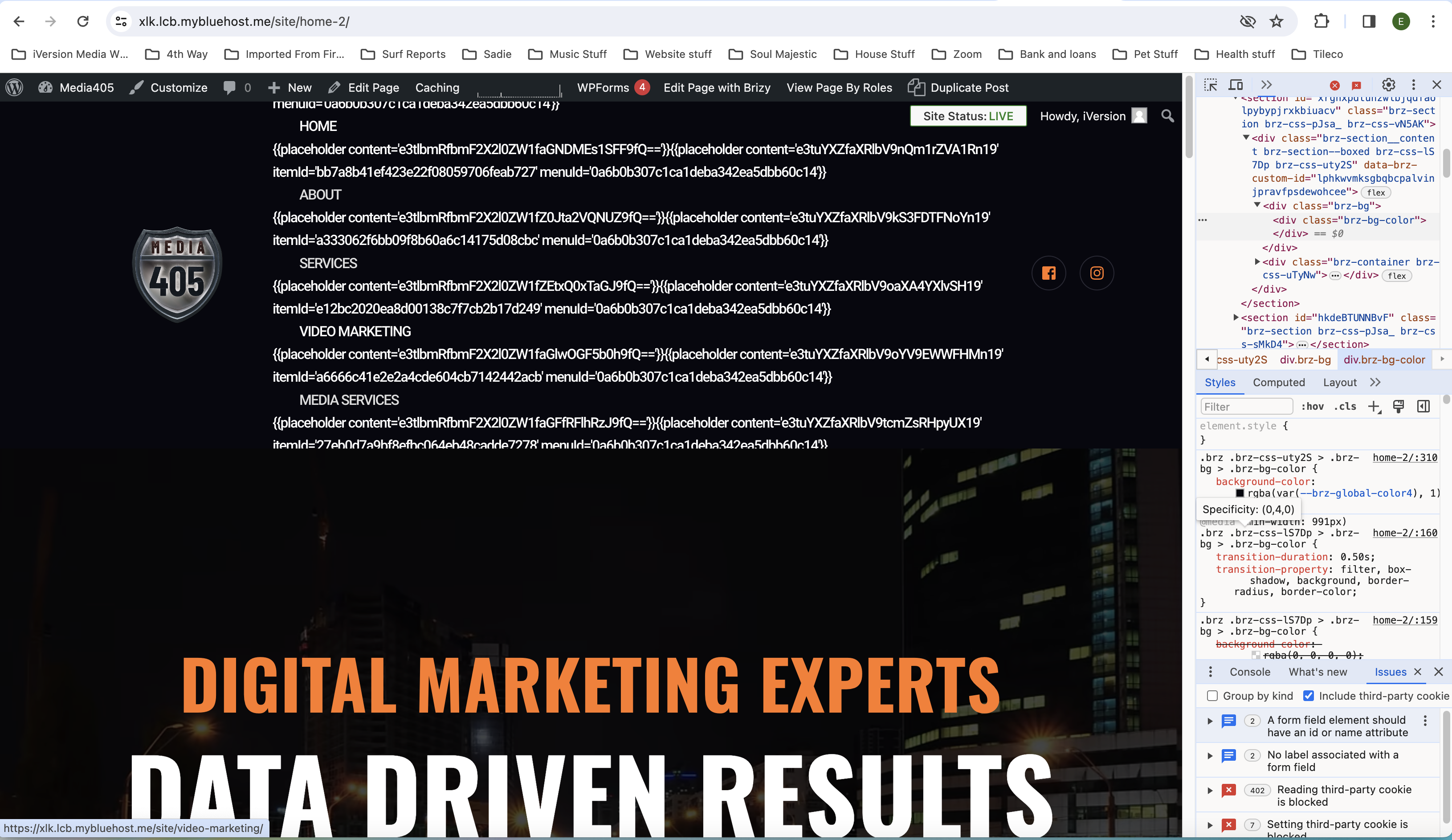
-
here is the URL to the site
https://xlk.lcb.mybluehost.me/site
0 -

Hi Eric,
Thank you for reaching out to us.
I have reviewed the URL you provided, but I couldn't find the error you mentioned in your screenshot. Have you reverted it back to the previous version?
If that is the case, could you please provide us temporary access to your WP Admin page? This will allow us to investigate the issue further. Please add us as an Admin user to your WordPress Dashboard and send the following details to: communitysupport@brizy.io
Community Post link: https://support.brizy.io/hc/en-us/community/posts/17809946900242
WordPress Admin URL:
Username:
Password:Please make a full backup of your site as a precaution.
Best regards,
Ariel H.0 -

Hi Nick,
The menu looks fine at my end. Kindly clear cache and check again.
 0
0 -
Hi Nick,
We have received similar reports recently, we have already reported this issue to our senior support team for further investigation.
In the meantime, you can roll back to the previous versions using the following links:
- Brizy 2.4.41 https://jmp.sh/tFeCfvJl
- Brizy Pro 2.4.36 https://jmp.sh/ThPSvsgA
Kindly follow this procedure to roll back.
- Deactivate and delete Brizy Pro
- Deactivate and delete Brizy
- Download Brizy 2.4.41 and in your WordPress Dashboard under Plugins - Add New - Upload Plugin, upload Brizy
- Download Brizy Pro 2.4.36 and under Plugins - Add New - Upload Plugin, upload Brizy Pro
Best regards,
Ariel H.0 -

I also have the same problem, after the last update, my menu changed completely and sometimes I don't even get links from my pages to other pages, but I deleted the cache and now it works, but I'll see in two days if it happens again, could you fix it, thank you very much0 -
Hi Ludovit,
Thank you for reaching out to us.
The issue is intermittent, in case it happens again, please follow the instructions provided above to roll back to the previous version until we have a fix for this issue.
Sorry for the inconvenience.
Best regards,
Ariel H.0 -
Hi Nick and Ludovit,
Thank you for your patience.
We have now rolled out an update to address this issue. Please give it a try and let me know how it goes.
Best regards,
Ariel H.0 -
hi, I watched it now and it's fine, thank you very much0
Please sign in to leave a comment.
Comments
8 comments