Image inside of popup linked to action of closing pop up does not work

Hi, in my case I do link from an image "A" to create a popup (so far so good) where I have another image "B" to act after clicking on it to close the popup. I'm disabling the close sign (x) and also the "click outside of popup". So the image"B" I'm linking to switch on the action of closing the popup, the builder lets me do this but on the front-end, it does not seem to work. Am I doing something wrong or is there some other issue? Please let me know. Many thanks.
-

Hi Vladimir,
I'm sorry; I could not fully understand the issue you are facing. Could you provide us with a screenshot or record your screen so we can have a better understanding of the problem you are having?
0 -
Hello Kc George, ok I'll try to explain,
it is an image inside of popup and I'm trying to link it to action: close popup. Once saved I refresh the page and click on that image but nothing happening, it is not closing the popup. Please advice. Thank you!
0 -
Hi Vladimir,
Are you referring to the 'Close Popup' option provided under the 'link' icon under the 'Action' tab? The 'Close Popup action was originally designed for forms added within Popups. This option helps to close the popup when the form is submitted.
The Brizy popup is not designed to close when the user clicks on the image. It is by error we have included this option in the user interface for the image element. Kindly disregard this option.
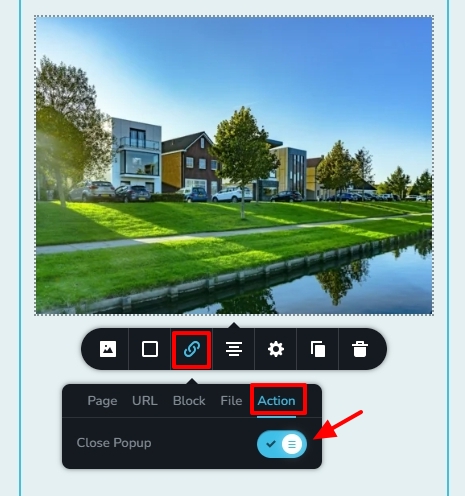 0
0 -
Ok well understood. Any way is there a chance this could be implemented? Would be very useful. Thank you.
0 -
Hi Vladimir,
Have you come across a website using this feature in a popup? In that case, could you please let us know the URL of the page where we may view an example of a popup that closes upon clicking on an image? This will assist us in creating the necessary Brizy implementation of this functionality.
0 -
Basically there is no URL to share yet as page still under building. But I'll try to give an example. The page logo name is made using a very square font design (''Square Head'') so hamburger menu sign is made as a .svg vector image matching to this font. So menu hamburger image is opening a popup which is menu itself. To close the menu (popup) I wanted to use a close button ''X''made as an image (letter X from the same font to match with the logo). That's why clicking on that image would be very useful to be able to close the popup.
Temporary I found a solution to this problem putting the popup's close button exactly over the image and making it transparent. So it is there and works to close the popup but it is invisible and on the front end you only see the image.
When clicked on it the menu/popup is closing. Regards.
0
Please sign in to leave a comment.
Comments
6 comments