How to add dynamic alt text to image

Hello,
I have defined an Advanced Custom Asset and have several items with the asset group that each have a page.
I have a global block to be shown on every page for each item within the asset group that includes an image.
I would like to add a dynamic alt title for that image based on the name of the item.
The database icon is missing for the alt text field -- you can see in the image below that it is present for CSS ID, CSS class and Custom Attributes, but not Alt Title.
How can I add dynamic alt text to an image? I would like to do this so that my page is easier to use for people that have screen readers. 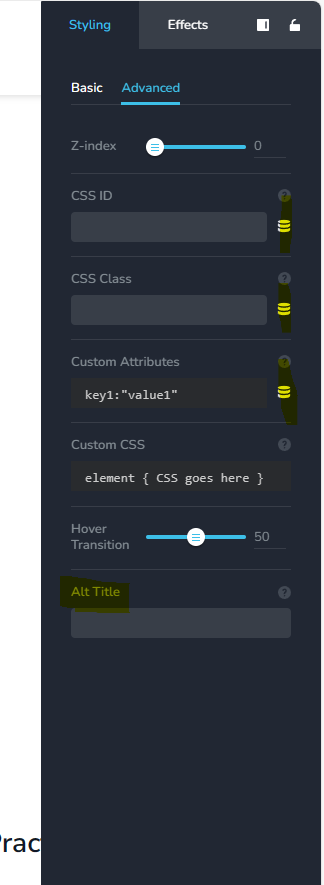
-

Hi Ada,
Thank you for reaching out to us.
I regret to inform you that currently, it is not possible to assign a dynamic Alt text to an image. As of now, you will need to manually add the Alt text to each image you use on your website.
I apologize for any inconvenience this may cause.
Best regards,
Ariel H.0 -
Hi Areil,
Thank you for your response, but how do I do this when the image is dynamic and within in global block tied to an Advanced Custom Asset?
Every time I update the image Alt Title on one of the pages, it uses the same Alt Title on all of the pages.
Any help you can provide to help me figure out how to add the Alt Title to an image that is placed dynamically would be greatly appreciated.Thank you!
0 -

Hi Ada,
We regret that adding image Alt text is possible only with static images at the moment. With dynamic images which are part of a global block, it is currently not possible to add Alt text.
0
Please sign in to leave a comment.
Comments
3 comments