Custom CSS on more than one element on a page?

Hello,
I'm having a challenge with applying custom CSS to a embedded code for a button.
Issue1: I'm trying to get it to match the builder's style sheet, and can't figure out how to change the button's hover state color in CSS.
Issue 2: I've successfully applied styles to one button, but when I try to embed another button (a separate embed code, with a different id), brizy doesn't recognize the second Custom CSS input and leave the button in its normal style. What am I doing wrong?
See screen recording here:
https://app.usebubbles.com/h9BAfnPgxkG4FpZymPb1jP/brizy-custom-css
-

Hi Kris,
Thank you for reaching out to us.
Could you please share the URL of the page so that we can inspect it? Rest assured; we will not publish the URL on this support thread if you want to keep it private. Additionally, please provide the script that you have embedded so that we can replicate the issue and possibly offer a solution.
Kind regards,
Ariel H.0 -
Hi Ariel, thanks for responding and your offer to help!
The url is:
https://sites.healthcareexperience.org/certificates/healthcare-experience-excellence/
- Scroll to the bottom of the page.
- The top button is the Eventbrite embedded link, the bottom two buttons are the native buttons built with the Brizy builder.
https://sites.healthcareexperience.org/certificates/diversity-equity-inclusion/
- Same location on this page.
- Both of these buttons use a Eventbrite embedded link
- The top one is styled using Custom CSS for the button's unique id.
- The bottom button is styled using the same Custom CSS for that button's unique id, but isn't being rendered for some reason.
- Both custom CSS are applied by clicking on each individual button, and adding the custom CSS in the Advanced settings for those particular button (please let me know if there's another way to do this).
The CSS being used is (with UNIQUEID being replaced for each specific embedded button):
button#eventbrite-widget-modal-trigger-UNIQUEID {
    font-family: overpass;
    font-size: 15px;
    font-weight: 700;
    font-style: normal;
    color: #ffffff;
    border: 0;
    position: relative;
    display: block;
    float: left;
    width: 200px;
    background-color: #333399;
    padding: 15px;
    border-radius: 10px;
}
My questions:
- How do I change the hover style in custom CSS?
- What am I doing wrong with the custom CSS for the second button that the system won't recognize it?
Thank you! :)
0 -

Hi Kris,
Kindly consider adding CSS to the Everbrite Embed HTML code rather than the Brizy Embed element. Try this code instead of the one you have embedded.
<button id="eventbrite-widget-modal-trigger-845249703617" type="button">Buy Tickets</button>
<style>
 button {
    font-family: overpass;
    font-size: 15px;
    font-weight: 700;
    font-style: normal;
    color: #ffffff;
    border: 0;
    position: relative;
    width: 200px;
    background-color: #333399;
    border-radius: 10px;
    padding: 20px;
    text-align: center;
      }

button:hover {
    background-color: #d74545;
}
    </style>

<script src="https://www.eventbrite.com/static/widgets/eb_widgets.js"></script>

<script type="text/javascript">
    var exampleCallback = function() {
        console.log('Order complete!');
    };

    window.EBWidgets.createWidget({
        widgetType: 'checkout',
        eventId: '845249703617',
        modal: true,
        modalTriggerElementId: 'eventbrite-widget-modal-trigger-845249703617',
        onOrderComplete: exampleCallback
    });
</script>
0 -
Thank you KC for your solution.
I'm having a difficult time understanding what you mean by "adding CSS to eventbrite embed html code rather than the Brizy embed element."
Should the code you provided be pasted into the Custom CSS panel by clicking on the button > Settings > Advanced?
Or are you saying I should be pasting the code into the Brizy embed module?
Or should I be creating the button using the Brizy builder (and pointing to the URL provided), but using the CSS you offered in the Custom CSS panel?
Thank you,
Kris
0 -
KC, disregard my last comment. I was able to get it to work, thank you!
https://sites.healthcareexperience.org/certificates/diversity-equity-inclusion/#Certificate-CTA
Two things I noticed:
- The "hand icon" no longer works when hovering over the button to indicate that it is clickable. Any ideas how to activate that? Or is the embed code preventing that?
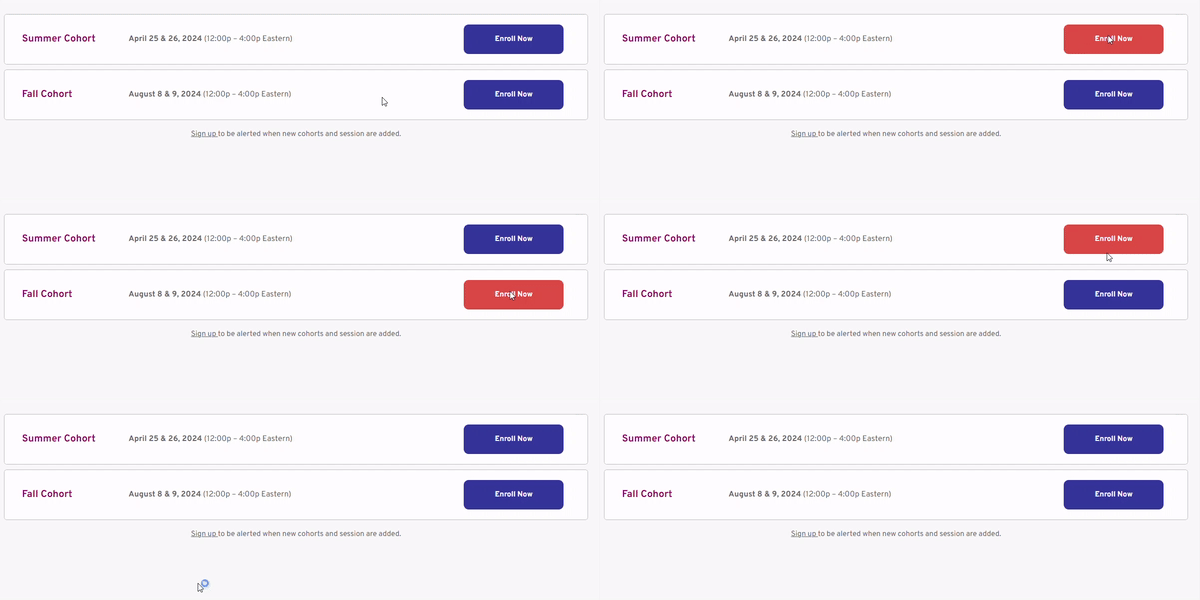
- The hover color isn't rendering. Apparently, it only works when there is one button on the page, but not multiple. Any suggestions?
Thank you so much for your help. I really do appreciate you!
0 -
Hi Kris,
All the styling that you wanted to add to the Eventbrite button has been added to the embed code. Please copy and paste the code provided above into the Brizy Embed element and verify if Eventbrite button design looks similar to the Brizy button.
This is the part of the code which sets the the hover color for the Eventbrite button. Change the color in this code to set the appropriate hover color.
button:hover {
    background-color: #d74545;
}
0 -
Hi Kris,
- The "hand icon" not working when hovering over the button could be the way Eventbrite button is designed to work. You may want to check with Eventbrite support if that is normal behavior.
- The hover color for both buttons appear working fine at my end.
 0
0
Please sign in to leave a comment.
Comments
7 comments