Header / Title not working responsively

HI
Hi! Some of my words/ blocks are not working responsively. My title for example in some screen sizes separates words - it adjusts correctly at some sizes but not others. Ive adjusted the phone / tablet commands but the issue is primarily on laptop / desktop browsers.
Same issue with one of the titles to a block
-

Hi Elizabeth,
Are you referring to the title COMPASSIONATE CAPITAL added to the hero section of your website https://compassionatecapitalkc.com/?
Kindly consider removing the right padding of 45% added to the column around the title.
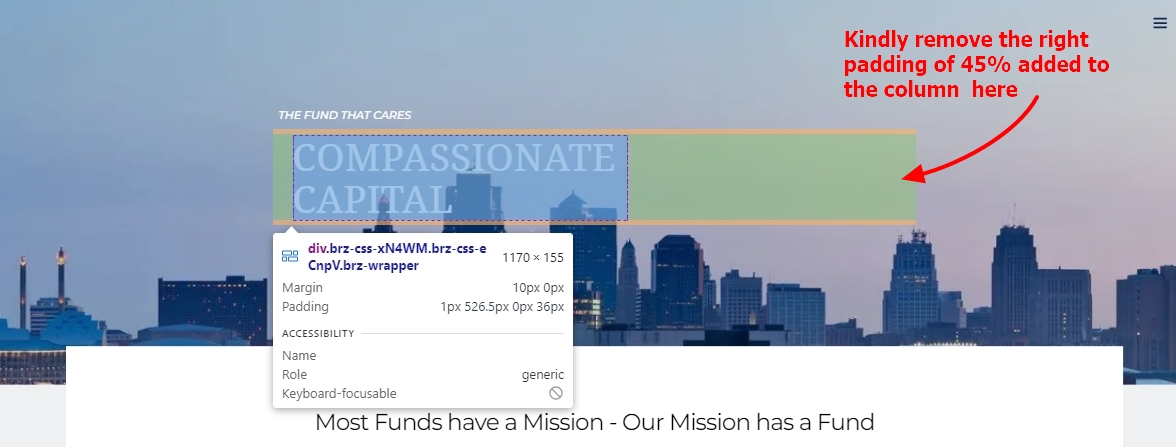
To enhance the text's responsiveness, add an additional column to the right and slide the left column handle to widen the space between the text and the column's edge.
 0
0 -
Yes, I will l try that. I did not change the padding, that’s exactly how the template was set.
Also, there seems to be a white box covering the photo on the header. Do you know how to get rid of that?
It’s a portion of the bottom of the picture
0 -
Hi Elizabeth,
Your homepage design is no more available at https://compassionatecapitalkc.com/ and hence could not see the white box overlapping with the hero section. Usually an overlapping section is designed in Brizy by adding a negative top margin to the content in the block below. Kindly watch the screen recording at https://jmp.sh/hXX3iFs6 for the procedure to remove the overlapping content.
If the above procedure does not help, kindly get back to us. We will need to look at your project to offer further help.
0
Please sign in to leave a comment.
Comments
3 comments