Mobile Menu Width

How do you shrink the width of the menu on mobile? Right now when you click the hamburger menu icon and the menu appears it takes up 75% of the screen. Want to shrink the width to only go about 50% of the page width.
-

Hi Kyla,
You can reduce the width of the columns in your header by dragging its edge.
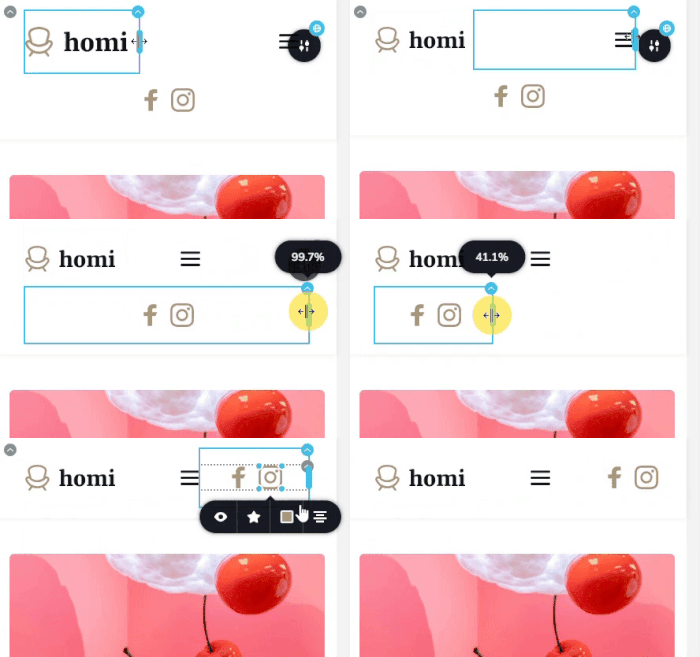
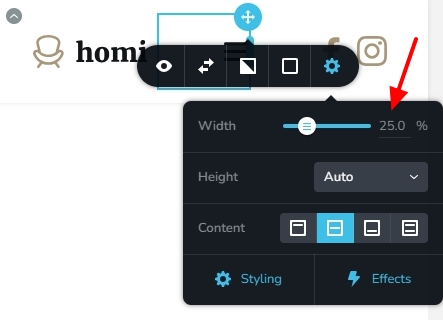
You can also set the width of each column by typing a percentage value.
 0
0 -
How about the hamburger menu itself ?
0 -
Hi Kyla,
Brizy does not have an option to set the width of the hamburger menu drawer.
You have the option to design your own menu drawer using the Brizy popup builder. In this approach, you can set the width and height of the menu drawer and the menu drawer design can be fully customized. Kindly check out the hamburger menu setup using the Brizy popup builder at https://www.rishikeshwalks.in/ Have a look at the first part of this tutorial for the procedure 3 Ways to Use Popup Builders: Website Navigation, Back to Top Button, Deals or Cookie Notification
0
Please sign in to leave a comment.
Comments
3 comments