Slider Problems with Safari

Hello,
My slider is working fine on Chrome but is experiencing lag on Safari and doesn't work correctly and I can't figure out how to fix this issue. The website is: jac****e.wpcomstaging.com
Thanks!
-

Hi Roman,
Thank you for reaching out to us.
I have inspected your site however; it appears to be working at my end. This is demonstrated on this screencast - https://youtu.be/V82ClWyTUDM
As you can see, I'm using Safari, and the slider is working as expected. Could you please try clearing your browser cache and see if this will help fix the issue? Also ensure that you are using the most recent version of Safari.
Please try this and let me know how it goes.
Kind regards,
Ariel H.0 -
Hi Ariel,
It still looks a little weird on your screen cast. It doesn't flow smoothly like it does on Chrome. There is a strange little delay between the slides and they start to slide a little janky. Take a look at how smooth, quick, and flawless the transition is in Chrome.Thanks!0 -
Hi Roman,
Thank you for the update.
Could you please save and download this layout and send it to us for review? To do this, you can follow the steps outlined in this tutorial: https://youtu.be/MOzeGgAmvqA
Once you've downloaded the file, please upload it to either OneDrive or Google Drive and share it with us. This will allow us to replicate the issue on our side.Best regards,
Ariel H.0 -
Hi Ariel,
Here is the link:----
I have another website that is doing the same thing on Safari with the janky slider that you can see as well:
ath*******ady.comWith this website as well it is smooth, quick, and flawless with its transition in Chrome and not so at all with Safari.
Thanks!
0 -
Hi Roman,
Thank you for your cooperation.
Upon checking, this maybe a result of the rendering difference between Chrome and Safari. However, I would like to escalate this issue to our senior support so they can further investigate the issue. Could you please provide us temporary access to your staging site at jac****e.wpcomstaging.com. Please add us as an Admin user and send the following details to communitysupport@brizy.io:
- Community Support link: https://support.brizy.io/hc/en-us/community/posts/17357082438802
- Admin User:
- Password:As a precaution, please make a full backup of your website.
Best regards,
Ariel h.0 -
Ok thanks I sent it, please let me know if there are any issues with the Admin access.
0 -
Hi Roman,
Thank you for your cooperation.
We attempted to log in with the details you provided, but they don't seem to be working.
Could you please review and send us the correct login credentials for your site?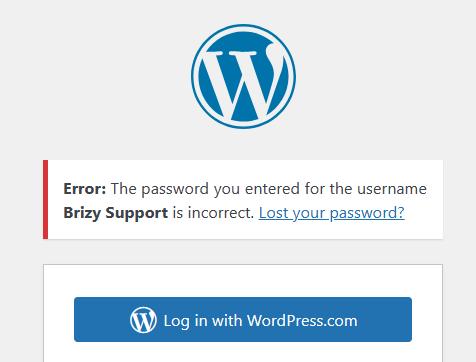
Best regards,
Ariel H.0 -
Hi Roman,
Thank you for your cooperation.
I have now escalated this issue to one of my colleagues to further investigate the issue. You should receive a reply as soon as possible.
Kind regards,
Ariel H.0
Please sign in to leave a comment.
Comments
8 comments