Archive template not displaying listing of posts based on the selection of categories

Hi,
We've developed an archive template designed to showcase a comprehensive listing of all Custom Post Types (CPTs) along with their associated categories.
While the functionality for Custom Post Types functions correctly, we encounter an issue when attempting to view posts filtered by category; the listings fail to display as intended.
For your convenience, this is how the Custom Post Type (CPT) template appears:
https://www.secureitworld.com/infographic/
However, when we attempt to view the posts listed based on category selection:https://www.secureitworld.com/category/artificial-intelligence/
Conditions on archive template as in the screenshot
Archana
-

Hi Archana,
Do you have blog posts published under the artificial-intelligence category? Can you please share with us a screenshot of your blog posts with their respective categories? We would like to see the categories that are associated with your blog posts.
 0
0 -

Hi Noah,
Thank you for reaching out to us.
To address this issue, please try to update your sites Permalinks as shown below.

This is better explained on this article:
https://muffingroup.com/blog/remove-category-from-wordpress-url/Please try this and let me know how it goes.
Best regards,
Ariel H.0 -
Hi George and Ariel thanks for the reply.
I am attaching the screenshot of our blog list herewith. We do not wish to modify the permalink; instead, wherever our categories are displayed, they should link to the archive page of the respective category. Have already shared the credentials with the support@brizy.io as we are urgently looking for the solution

Regards
Archana
0 -
Hi Archana,
I have added a dummy featured image to the blog post at https://www.secureitworld.com/artificial-intelligence/demo-post-ai/ and the blog post started showing in the category archive page at https://www.secureitworld.com/category/artificial-intelligence/
 0
0 -
Hi George,
Thanks for the mail.
We utilize custom post types and have established categories for each of them. Consequently, clicking on a category should lead to its respective content.
Archana
1 -
Hi Archana,
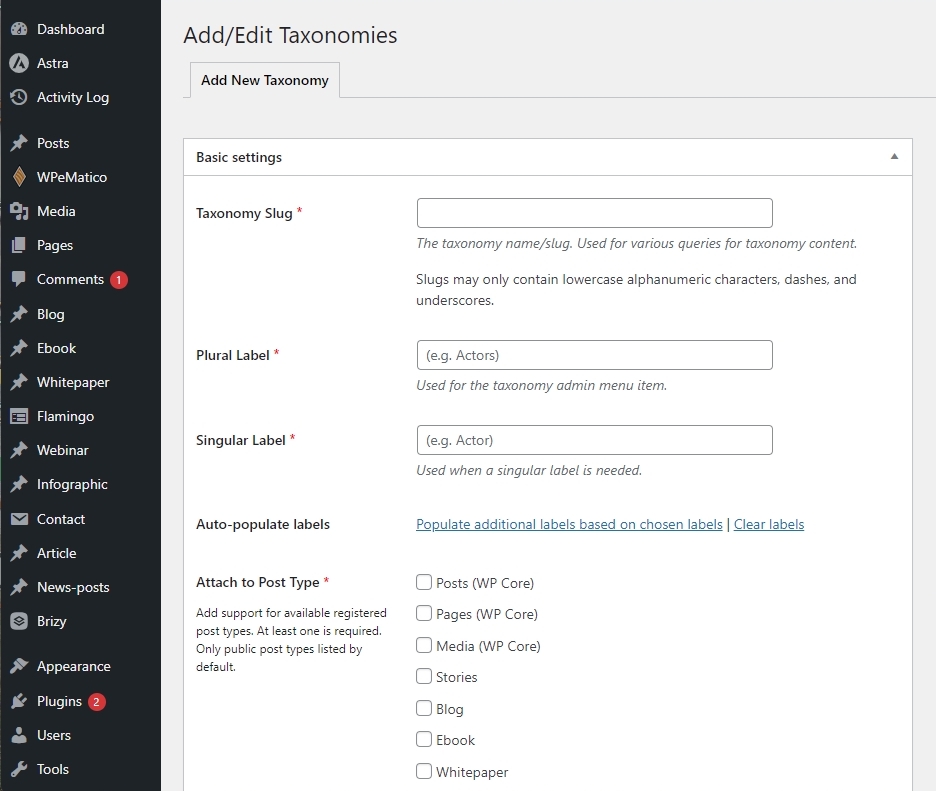
Currently all your CPTs share the same categories and tags. To accomplish what you are looking for, each CPT should have its own independent taxonomy. To accomplish this, kindly add new taxonomies for each CPT under CPT UI - Add/Edit taxonomies.
 0
0
Please sign in to leave a comment.
Comments
6 comments