Reorder Blocks Sidebar: Why are my blocks not pictured in the sidebar?

When I first started using Brizy, the blocks that I would create (either on my own or by using a template) would be reflected in the "Reorder Blocks" sidebar as I had created / modified them. Now, if I use a template to create a block, regardless of the fact that I modify the block, the "Reorder Blocks" sidebar pictures the block as it was when it was when it was downloaded as a template. It does not reflect any of the changes that I have made - even if the changes have been significant. This makes the process of reordering the blocks highly problematic.
Currently, I have some blocks (old blocks) that appear as I have created / modified them, and others that look like the templates provided by Brizy. Is there anything that I can do to ensure that all of the blocks in the "Reorder Blocks" sidebar look the same way as they do on the page that I am building?
-

Hi Randall,
This is due to a bug with the most recent Brizy versions. The preview of a regular (non-global) block that you create is not updated when the block is modified in the Reorder Blocks sidebar. Please follow the workaround given below while we take some time to fix this bug.
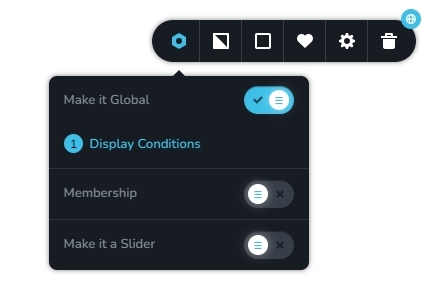
Kindly ensure that your blocks have the 'Make It Global' option enabled and maintain the automatic Display condition added. The Reorder Blocks sidebar will begin displaying a preview of every block when you convert all of your regular blocks to global.
 0
0
Please sign in to leave a comment.
Comments
1 comment