Text editing problems

Hi,
I have a problem on several sites. When I paste a text in a text block, the change seems to take place but when I look at the site page. The text has not changed.
You don't always see the text module edit bar. It's very strange.
Here's a short video to illustrate the problem.
Thanks for your help
Romain
-

Hi Romain,
We apologize for the inconvenience. Pasting of text does not work well at the moment. We are working on fixing this bug.
Please add a space after pasting text, save your work, and check the preview to see if the problem resolves. Have a look at this screen recording https://jmp.sh/Yj3Zd0Gm
0 -
Hi George,
Thank you for your response.
I hope you'll find a solution soon.
Because other editing problems are appearing and causing bugs. (for example: changing the H tag ...)
Thanks
0 -
Hi George,
I'm coming back to you to find out if you've been able to fix this bug, because it's getting more and more complicated to work with. And your proposed solution doesn't work in all cases.
And above all, we're starting to get feedback and questions from our customers.
Do you think this will be fixed before Monday?
I imagine the problem is complicated, but if we could have a little visibility it would help us reassure our customers.
Thanks you for your work
0 -
Hi Romain,
We won't be able to fix this issue by Monday. It is difficult to estimate the release date for a fix. We release updates once in a month or so. This could be part of the next Brizy update.
0 -
Hi Geoges,
Thanks for your response.
We can't wait that long.
There's nothing we can do. Today, we had to cancel two customer appointments because it's impossible to update the texts.Do you have any solutions for us?
We have 50 sites created with Brizy, so you can imagine our stress.If we go back to an earlier version of Brizy. That should fix the problem?
If so, where can we find the earlier versions?Thanks
0 -
Hi Romain,
Please try these previous versions of Brizy to roll back
- Brizy 2.4.35 https://jmp.sh/nSeW18v9
- Brizy Pro 2.4.32 https://jmp.sh/sjSYiihy
Kindly follow these steps to roll back.
- Deactivate and delete Brizy Pro
- Deactivate and delete Brizy
- Download Brizy 2.4.35 and in your WordPress Dashboard under Plugins - Add New - Upload Plugin, upload Brizy
- Download Brizy Pro 2.4.32 and under Plugins - Add New - Upload Plugin, upload Brizy Pro
0 -

I think this is the same issue I'm having in Brizy Cloud. I can update the text in text blocks, but it doesn't seem to register with the system. For example, the "update" button to save the new version is still grayed out, and if I change it and then "duplicate" the block, the original text is duplicated.
The other weird thing it that the system doesn't seem to recognize that this is a text block. For example, I can click on it and no options (size, font, etc) for text come up.
0 -
Hi David,
Please add a space after pasting text, save your work, and check the preview to see if the problem resolves. Have a look at this screen recording https://jmp.sh/Yj3Zd0Gm
0 -
Thank you, KC!
I'm not sure if this is a related problem, but https://video.bigpodcast.com/conversations/c6bd8d7b-07b2-5c34-9e28-fa2425c5abe4 is what I'm experiencing and it looks similar. Some of the text blocks don't seem to recognize changes, even when the changes are types in manually.
Any thoughts?
0 -
Hi David,
Thanks for reporting this bug. Our testing team is looking into this issue now.
While we work on fixing this issue, kindly recreate the Text element following the procedure below to update your project
- Drag a new Text element to the block
- Copy the entire text and paste into a text editor like Notepad in Windows
- Copy from the text editor and paste into the newly added Text element
- Delete the original Text element
You should be able to save your text changes after you recreate the Text element.
0 -
Hi Romain and David,
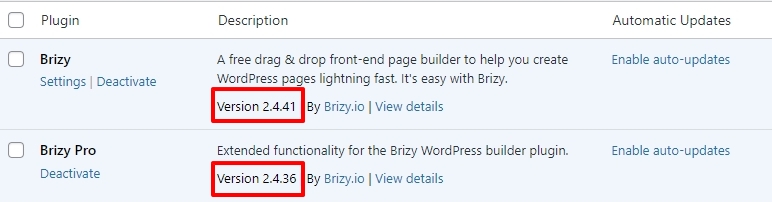
We have released a fix for the bug with the Text element in Brizy Cloud and Brizy WordPress. If you are on Brizy WP, please update on to these versions.
Please check if pasting of formatted and unformatted texts work well.
 1
1 -
Update is working great, KC! Thank you!
0
Please sign in to leave a comment.
Comments
12 comments