HTML export not exporting all pictures

Hi!
When exporting (HTML export) a site from Brizy cloud, not all pictures are exported (some have 0 bytes length). The site in question is https://grapefruit5151275.brizy.site/. The place where we want to upload HTML files and where the pictures are missing is https://www.bc-naklo.eu/srednja-poklicna-in-strokovna-sola/
Best regards,
Rok Dominko
-

Hi Rok,
Thank you for reaching out to us.
To further assist you, could you kindly provide us with the ZIP file so that we can replicate the issue on our end? You have the option to upload the file to your server or share it with us via Google Drive.
I am looking forward to your response.
Best regards,
Ariel H.0 -
Same is happening with the site accessible on https://naklo5024216.brizy.site/ which we want to publish here: https://www.bc-naklo.eu/visja-strokovna-sola/
And to the site accessible on https://cherry5207051.brizy.site/ which we want to publish here: https://www.bc-naklo.eu/gimnazija/
In all cases some pictures are missing because something went wrong at the export (some pictures were exported with 0 bytes size).
0 -
The file for the last site that I reported in my previous post is: https://bc-naklo.eu/gimnazija/project.zip
0 -
Hi Rok,
Thank you for your cooperation.
Upon checking it appears that images in the HTML Export may not function properly if your project was created using the old Brizy Cloud project format. Projects that were created before February 2021 use the old format. To determine whether your project use the current or older format, please examine the menu options available in the project thumbnail. I have attached a screenshot for your reference.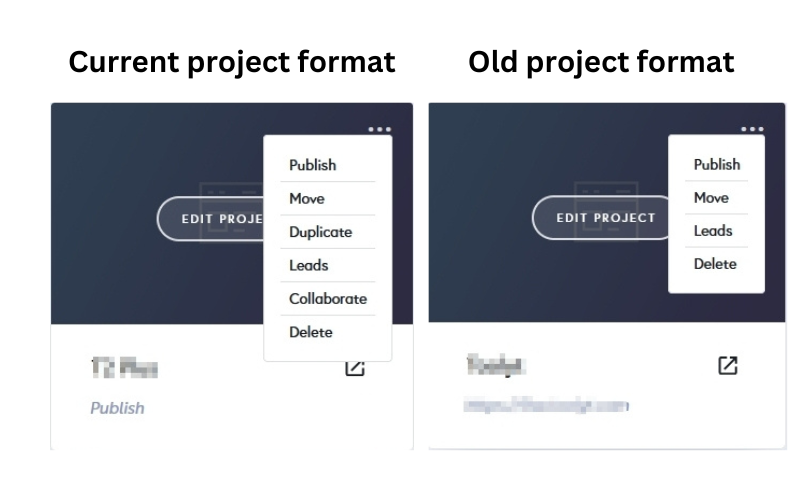
In order for the images to work seamlessly in the HTML Export, it is necessary to recreate the project using the current project format.
If you have any further questions or require additional assistance, please let me know.
Best regards,
Ariel H.0
Please sign in to leave a comment.
Comments
4 comments