Reorder Blocks - No Preview

Hello Team,
i have the following issue that my previews when i want to reorder the blocks are not showing anymore.
I paused working on my new homepage for a couple of month and there everything worked very well and i saw my preview for the header and the footer and also the block with the car
all new block i created on the page today are only showing "Started from Scratch"
Is there an issue with it.
I have no plugins like cache plugins or anything else which could cause this error

-

Hi Bernd,
Thanks for reporting this bug. When adding a blank block, Reorder Blocks does not show a preview of the newly created block. When importing a premade block, the customizations you make to the design also do not reflect in block preview. I have reported this bug and we will work on fixing it.
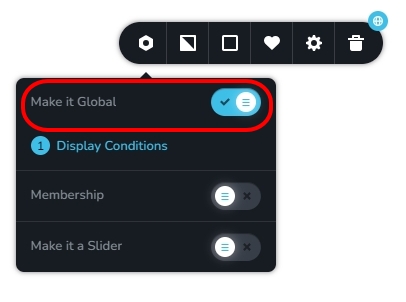
However, 'Reorder Blocks' show the right preview for global blocks. While we take time to fix this bug, please enable the 'Make It Global' option for the block and retain the automatically added display condition. When you do this, you will see the preview of the global block in 'Reorder Blocks'.
 0
0 -
Hi Team,
okay thank you for your information. So you do not need access to my WP Backend? (Got another mail 30 minutes before your Message)
Thanks
Bernd
0 -
Hi Bernd,
Since this is a bug which needs to be fixed by our developers, having access to your Dashboard may not help in resolving the issue.
0 -
Okay thanks for the information and the workaround with the Global Option works perfect!
Thanks for your quick help0
Please sign in to leave a comment.
Comments
4 comments