Brizy is bloated again

HI guys,
I had this issue with Brizy before and solved it by removing the shortpixel plugin.
The issue is back again (and no shortpixel plugin this time).
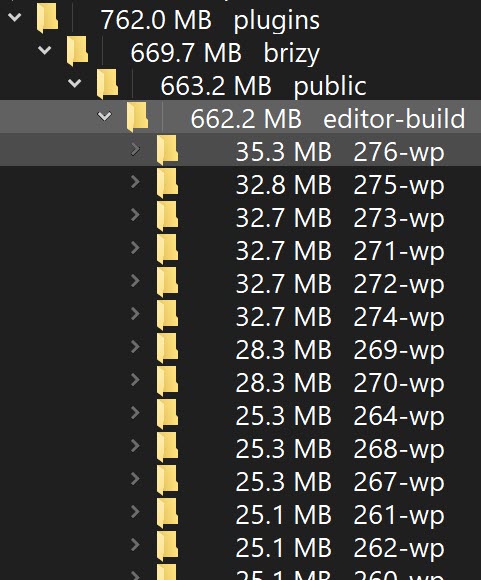
My Brizy folder is at 662MB for a 5 page site (with few graphics).
See the included screenshot
It has a bunch of folders numbered from 247 to 276. Can I delete some of these?
Running latest version of both free and pro plugins.
Thanks,
Alfred
-

Hi Alfred,
Thank you for reaching out to us.
I noticed that the website I manage has only one similar directory, and removing it caused errors in my pages. Therefore, we don't recommend deleting such directories.
Could you please provide us temporary access to your WP Admin credentials and also provide us access to FTP, so I can have somebody from our senior support check this issue?Please add us as an Admin user to your WordPress Dashboard and send the following details to: communitysupport@brizy.io
Community Post link: https://support.brizy.io/hc/en-us/community/posts/16441447318546
WordPress Admin URL:
Username:
Password:FTP Host:
Username:
Password:Please make a full backup of your site as a precaution.
Best regards,
Ariel H.0 -
Hi Ariel,
Appreciate the quick response.
My site has a stripe connection and I don't want to give complete access to someone I don't know. Nothing personal, but we live in a crazy world.
I can take those huge files from the Brizy directory (or the entire Brizy folders for that matter ) and put them in an ftp directory and give you full access to that.
Would that work? At least you guys could see what exactly those files are and if they can be deleted.
Please let me know.
Thanks,
Alfred
0 -
Hi Alfred,
Thank you for the update.
I understand your concern about your sites' privacy.
Unfortunately, sending us those files may not be useful as those files are directly linked to your pages. I recommend making a duplicate of your website or make a staging version of your website. You can use WPVIVID plugin to create a staging version of your website following the steps on this link:
https://wpvivid.com/create-a-wordpress-staging-site.htmlAfter setting up the staging site, you'll be able to access the files via your file manager. You can then start deleting the files one by one, beginning with the oldest, and subsequently check your pages to ensure nothing was affected. Please note that the error isn't visible on the front-end. It comes up when you attempt to edit pages, as demonstrated in this example - https://youtu.be/ZPnlaYAtsEk
In the meantime, I'll be consulting with our senior support about this issue and will provide you with an update as soon as I can.
Best regards,
Ariel H.0 -
Ariel,
What I was saying is that I would put the bloated errant files (the 500+mb Brizy folder) in its OWN ftp directly (as a copy). That way the tech brains can look at the files and see what they are.
Would that work best?
Thanks,
Alfred
0 -

Hi Alfred,
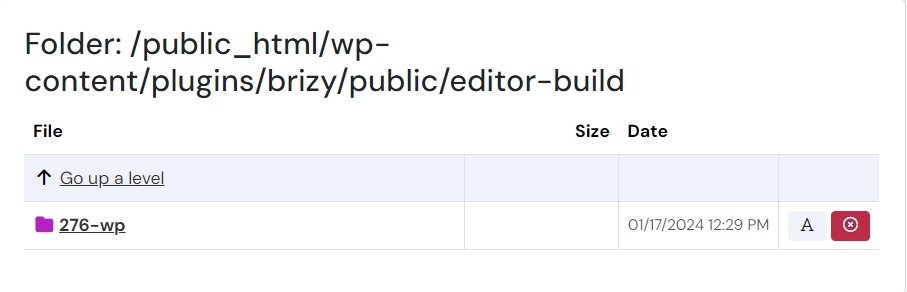
In 3 test websites I have, I see only a single folder under /wp-content/plugins/brizy/public/editor-build. It looks like only a single folder is required in this path for Brizy to work well. To eliminate the additional folders on your server, please try these three steps.
- Deactivate and delete Brizy
- Using the File Manager, confirm that the the /wp-content/plugins/brizy folder is deleted
- Install Brizy from the WordPress plugins repository again
 0
0 -
George,
First of all, thank you for following up on this. Here is what I found.
I exported my live site to a local WP site. Deleted all folders except the 276.
Result: it works fine!
I'm still doing all kinds of things to test the local site but as long as the last folder (in this case, the same one you mentioned) stays in there, all is good.
I wonder if the lightspeed plugin is the cause of this. I did delete it (and remove the cache) in one round of testing, but that didn't not delete the extra folders.
In any case, I hope this helps someone whenever Brizy needs a diet!
As a reminder to others troubleshooting, this happened to me before. The culprit in that case was the shortpixel plug in. Removed that and Brizy was trim and fit again.
Thanks again George (and Ariel) for not giving up on this.
All the best!
Alfred
0
Please sign in to leave a comment.
Comments
6 comments