Cannot add page to menu on website using brizy pro Word press

Hello,
I cannot add a new page to the menu on my website using Brizy Pro: Word Press. Please assist me with this as all of your videos seem outdated and do not have the "menu" button within appearance.
-

Hi Gianluca,
Thank you for reaching out to us.
It is possible that you are using one of the default themes on WordPress that doesn't include the traditional menu option under the Appearance section. Instead, these themes utilize the Navigation Block in the Full Site Editor for managing menus. For the menu to work properly, you may need to switch to a different theme that supports the classic navigation menus. Please switch to one of the themes found on this link - https://www.brizy.io/theme-partners
Once you've changed your theme, you can refer to this link for instructions on how to create a custom menu - https://support.brizy.io/hc/en-us/articles/360043773512-How-to-create-a-menu-in-WordPress
Please try this and let me know how it goes.
Best regards,
Ariel H.0 -
Ariel,
I am using a theme from Brizy at the moment, what is funny is that when I try to edit any page using Word Press instead of Brizy, it shows all pages in the menu. What you are asking me to do is change my whole website around because of the lack of menu customization. Right?
0 -
Hi Gianluca,
Apologies for any confusion caused earlier. It appears that I may not have fully understood the issue you're facing. To assist you better, could you please create a short screencast (using loom.com) to demonstrate the problem? This will provide us with a clearer understanding of the issue and enable us to offer a suitable solution.
Best regards,
Ariel H.0 -
I am still getting a "pending approval" when linking my loom video:
https://www.loom.com/share/49ec6c313aa7423299700c28911d1b59?sid=a107db75-811c-4cf7-b151-4fb832032a7f
0 -

Hi Gianluca,
To add more pages to your menu by going to Appearance - Menus option, you must install Blocksy or another theme featured at https://www.brizy.io/theme-partners. Can you please confirm if you have installed and activated Blocksy theme?
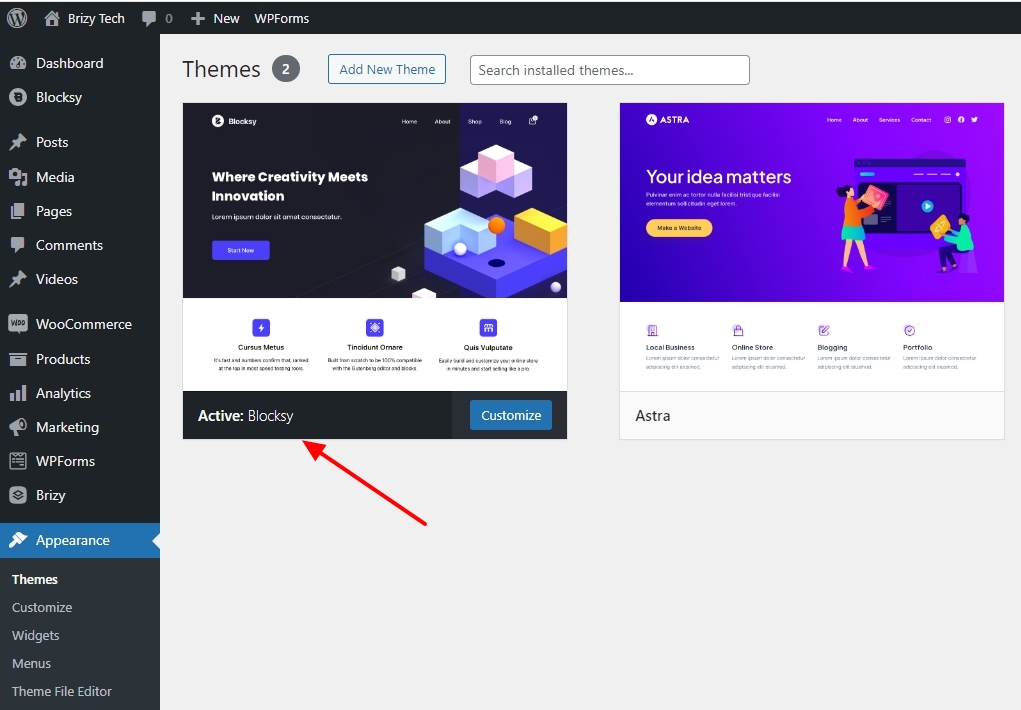 0
0 -
This has resolved the issue. Can you please create a tutorial on youtube or add this to your Brizy KB for other users? This was extremely confusing and luckily I am tech-savvy enough to understand what to do.
0 -
Hi Gianluca,
Thank you for the update, I'm glad that this is now sorted out.
We already have a tutorial on this link - https://support.brizy.io/hc/en-us/articles/360043773512-How-to-create-a-menu-in-WordPress
Additionally, the same video is also available on our YouTube channel: - https://www.youtube.com/watch?v=MDaj6_V424UKind regards,
Ariel H.0
Please sign in to leave a comment.
Comments
8 comments