Brizy licence deactivate

Hi i havent used my brizy account for a long time so i dont remember where are used my licence. When i tried using it today, i got the message "Brizy Pro does not support multisite license anymore."
Is there a way i can deactivate it from brizy site and then activate it again so i can use on my new site. i dont remember where i used the licence as it has been years...
-

Hi Ali,
Thank you for reaching out to us.
To resolve this issue, you can network activate Brizy Free version. As for Brizy Pro, it must be installed separately on the network site and the license should be activated from there.
This is documented on this support article:
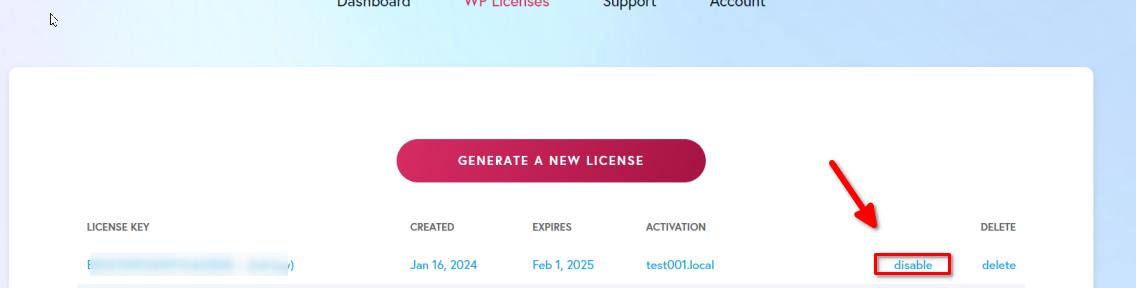
https://support.brizy.io/hc/en-us/articles/15941335839121-How-are-the-PRO-licenses-white-label-options-working-in-a-WordPress-multisite-networkIf you want to deactivate the license, you'll need to sign in to your account at https://www.brizy.io/. Once you're in, head over to the WP licenses tab, find the license for your site, and hit disable. If you want, you can also create a new license.
If you have any further questions, please let us know.Best regards,
Ariel H.0 -
Unfortunately my key doesnt have the option, what should i do?
 0
0 -

Hi Ali,
You have not used the above license key on any project yet. When you add a license key to a project, the URL of the project will appear under the heading 'Activation'. Then you will will be able to disable it.
 0
0
Please sign in to leave a comment.
Comments
3 comments