Dragging bug - when I drag element, it drag the wrong element


Installed:

-
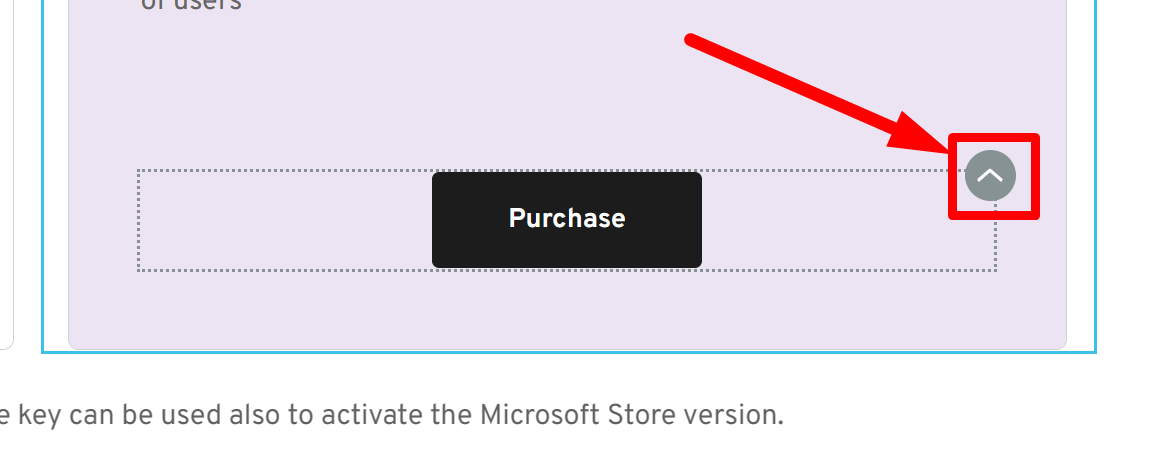
Something I noticed - if you drag it not from the "^", it works as expected
0 -

Hi Gil,
We appreciate you pointing out this issue. It appears to be a glitch from our recent update. We now raised this issue to our developers so it can be fixed in the next update.
Kind regards,
Ariel H.0 -
Thanks
Another thing that I noticed, sometimes the shortcut to revert change (CTRL+Z) revert the wrong thing.
0 -
Hi Gil,
Thank you for the update.
Unfortunately, I am unable to reproduce the issue, this is demonstrated on this screencast - https://youtu.be/PRTk2hkWqno
Would you be able to provide us a short screencast to demonstrate the issue?Also, it would be great if you could create a new separate support post or thread. It will make it easier for us to escalate the issue if needed.
Best regards,
Ariel H.0 -
Ariel H.
In my case it work if you drag it not from the ^ button.
In your video you drag it not from the ^ button.
Try to drag it from the ^ button.
The ^ button is
 0
0 -
Hi Gil,
Thank you for the update.
I believe this is also connected to the ongoing issue we're experiencing with dragging elements using the ^ button. I will include this in our case notes.
Best regards,
Ariel H.0
Please sign in to leave a comment.
Comments
6 comments