Select field doesn't show correct font

Hi,
The select field on my form doesnt show the correct font. I have tried deleting the form and trying again with no luck. Also duplicating the form and using a different font doesn't work either.
Link to website is here and form is at the bottom l***a-and-****.co.uk
Thanks
-

Hi Adam,
Thank you for reaching out to us.
This is how the form looks like at my end:
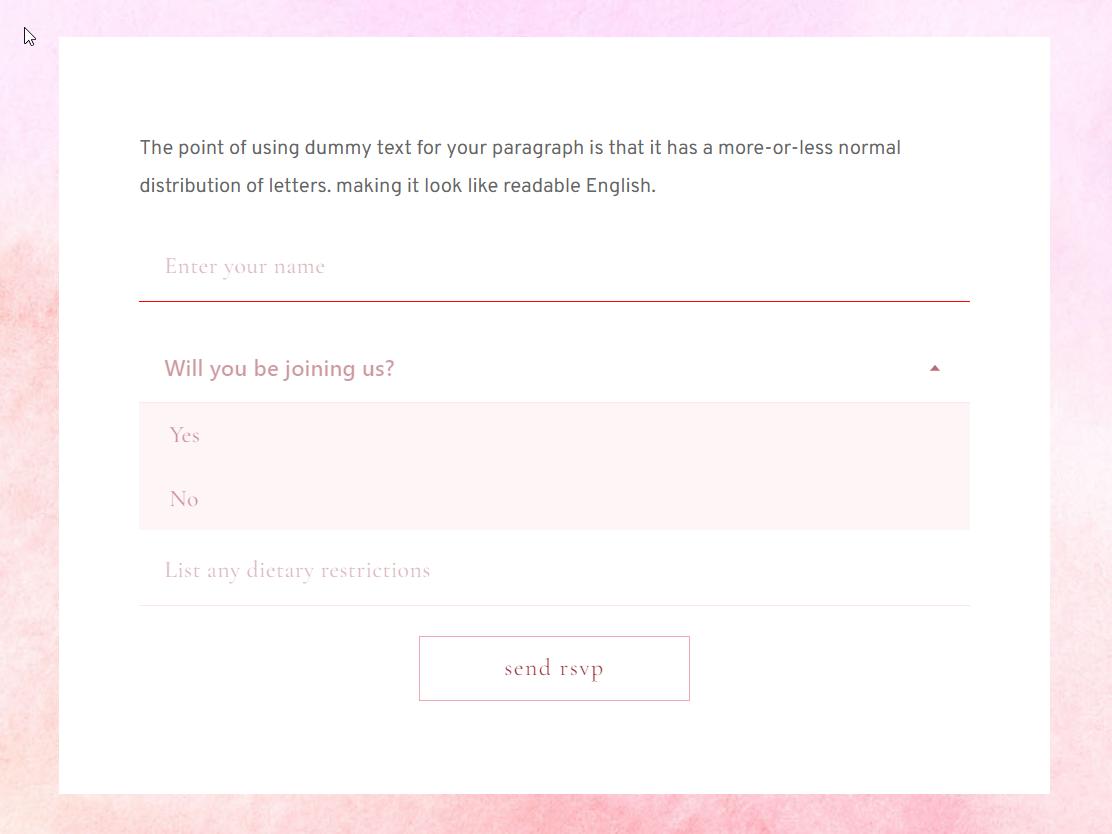
To better understand the issue, could you please let me know which font types you are expecting to see on the form?Best regards,
Ariel H.0 -
Hi Ariel,
So where it says 'will you be joining us' this should be Cormorant Garamond like the placeholder text in the text fields above and below. I have created styles for these but they don't seem to work on select fields.
Thanks
0 -
Hi Adam,
Thank you for the update.
It seems that the conflict is originating from your theme. This is demonstrated on this screencast - https://youtu.be/5iV7THcGI7k
To resolve the issue, please check your theme settings to see if there is an option to disable the CSS that is affecting the form input field. If there isn't, you can use the following custom CSS:
.select2-selection--single  {
  font-family: initial !important;
}
You can add this CSS by going to "Appearance" → "Customize" → "Additional CSS".
Please try this and let me know how it goes.
Best regards,
Ariel H.0 -
Oh ok thank you!
So I've activated the default WP 2024 theme and now the select feields are displaying the correct font!
Thanks
0 -
The only thing I can't see is Additonal CSS under appearance.
How do I get this to show if I want to add additonal CSS?
0 -
Hi Adam,
Thank you for the update.
Unfortunately, this option is no longer available in the 2024 theme. However, there are a couple of alternatives you can explore. Firstly, you can consider using another theme from the Brizy theme partners (https://www.brizy.io/theme-partners). Alternatively, you can install a small plugin called WPCode, which allows you to add custom CSS. I have prepared a screencast (https://youtu.be/FPbuVubYT1w) demonstrating how to use this plugin. It also provides useful code snippets that you might find helpful for your site.
I hope this helps.
Best regards,
Ariel H.0 -
Thanks Ariel,
Installing blocksy made the Additional CSS available!
Thanks again for your help
0
Please sign in to leave a comment.
Comments
7 comments