Brizy plugin - menu on mobile not working

Hi guys, in my staging website, the menu from mobile does not work.
From desktop is all fine, when I click on the mobile icon within the builder to see the mobile preview, it works, but it does not at all when accessing from mobile.
I tried many different browsers: Chrome, Brave, Safari and Firefox and cleared the cache of all the browsers and of the website. Can you help me?
On top on this, the font size on mobile does not match the desktop version: if the paragraph is set at 16 pt on desktop, if often happens that on the mobile version is much bigger or smaller. This is a huge problem.
-

Hi Alessia,
Thank you for contacting us.
To better assist you with the issue, could you please provide us with the URL of your website? Additionally, if you can share some screenshots to demonstrate the problem, it would be really helpful. This way, we can inspect the issue more accurately and possibly offer a solution.
Best regards,
Ariel H.0 -
Hi Ariel, you can check the website from this link: https://staging.alessiapandolfi.com/
I don't know why the maintenance mode from Brizy i set is not working either. So you can access from mobile and see that the menu doesn't work. Once that is sorted I will be able to send you screenshots of the difference in fonts showing from mobile.
0 -
Hi Alessia,
Thank you for your cooperation.
It seems that the issue you're experiencing is related to the LiteSpeed Cache plugin. To resolve this, I suggest clicking on "Purge All Cache" and then temporarily disabling the plugin in the plugins area. This will help determine if the optimizations made with CSS/JS are causing the problem.
Please try this and let me know how it goes.
Best regards,
Ariel H.0 -
Hi Ariel, I followed the steps you mentioned but it still doesn't work. The plugin is still deactivated.
Thanks!
0 -
Hi Alessia,
Thank you for the update.
Could you please try increasing the z-index value of the menu container or the menu element and see if this fixes the issue? This is demonstrated on this screencast - https://imgur.com/a/odsRn0y
Otherwise, this is something we need to inspect from your WP Admin page. Please add us as an Admin user to your WordPress Dashboard and send the following details to: communitysupport@brizy.io
Community Post link: https://support.brizy.io/hc/en-us/community/posts/16558718012178
WordPress Admin URL:
Username:
Password:Please make a full backup of your site as a precaution.
Best regards,
Ariel H.0 -
Hey, i tried but it doesn't seem to work, i'm sending now the login details
0 -
Hi Alessia,
Thank you for your cooperation.
I tried using the WordPress login details you provided, but unfortunately, they don't seem to work.
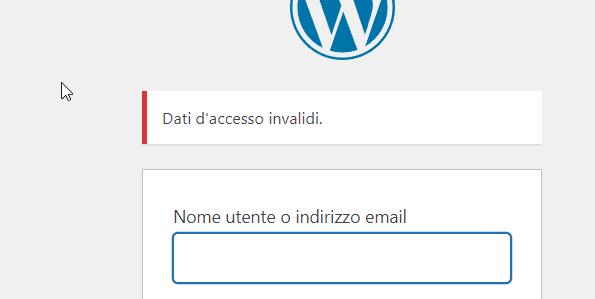
Could you please double-check the login credentials and revise them if necessary and send them again? Once you've made the necessary revisions, please let me know so that I can try logging in again and assist you further.
Best regards,
Ariel H.0 -
Hi Alessia,
Thank you for your cooperation.
It appears that the GDPR Cookie Consent plugin is interfering with this functionality. To address this issue, instead of increasing the z-index value of the menu element, I raised the z-index value of the column container.
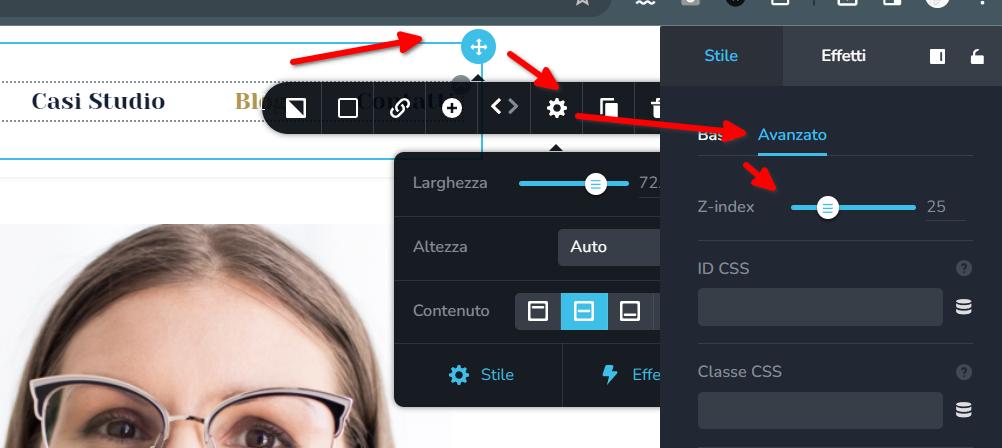
I tested this on my Android phone, and it appears to be working correctly.
Please also try this at your end and let me know how it goes.
Best regards,
Ariel H.0 -
Hi Ariel, i haven't received any more answers to my email. This matter is not solved yet, no matter the mobile browser I use: Chrome, Brave or others. It just does not work.
0 -

Hi Alessia,
If you deactivate the CookieYes plugin, the mobile menu appears working fine. Would you be open to try another GDPR compliance plugin? You could look through alternate plugin options here https://www.webtoffee.com/best-wordpress-gdpr-plugins/
0
Please sign in to leave a comment.
Comments
10 comments