Display problem with truncated Brizy-Hero's

Hello dear Brizy team,
I also have this display problem with the truncated hero images.
In the Brizy-Builder everything is still OK, but as soon as you call the websites in a browser, you see the disaster.
This is the case since the Brizy update to 2.4.22 and since the Brizy Pro update to 2.4.21 - 2023-06-20. Before that the problem did not exist!
Hero's are displayed cleanly at breakpoints for desktop's, as should be. But for mobile tablet's and mobile SmartPhones the Hero's are cut off in the lower half !!! This happens in all popular web browsers.
Now I have invested many hours to get to the bottom of this. Below is what I did.
My actions to narrow down the cause:
- Update to the current Brizy WP PlugIn 2.4.24
- Update to the current Brizy Pro WP PlugIn 2.4.23
- Staging a copy of my website to test without danger.
- Targeted disabling of optimization features in WP Rocket:
- LazyLoad turned off (Did nothing!).
- Minify CSS files disabled (Didn't help!)
- Minify JavaScript files disabled (Didn't help!)
- Fill cache disabled, DNS prefetch disabled (Didn't help!)
- Disable Heartbeat API activity (Didn't help!)
- Start WP Rocket in "Safe Mode" (Didn't help!)
- Completely emptied the cache (Didn't help!)
- Complete deactivation of WP Rocket (Didn't help!)
- Uninstalling WP Rocket (Didn't help!)
And last but not least out of desperation:
- Complete disabling of Yoast SEO (Did nothing!).
Even completely removing WP Rocket plugin didn't solve the display problem, so the issue should be with Brizy. That's what there is to report from my side and it relates to my WP setup. Now how it looks like with other customers who use Hero images as well and which setups they use, I don't know.
But please, can you fix this problem soon?
Currently I am still building my online platform, but I would like to officially launch my website as soon as possible.
Here is the example of my website with WP Rocket and Yoast SEO active.
https//scythiq.com
And here I did a complete staging of my website, on which I did all the tests listed above and uninstalled the PlugIn WP Rocket. Yoast SEO I have deactivated.
https//scythiq.com/staging/
Best regards
NiK
-

Hi Nik,
Thank you for reaching out to us.
This is something we would like to investigate from your dashboard. Could you please provide us with the WordPress credentials to the staging site, so we can look into this issue further?
Please add us as a user to your WordPress Dashboard and send the following details to: communitysupport@brizy.io
Community Post link: https://support.brizy.io/hc/en-us/community/posts/16522451855633
WordPress Admin URL:
Username:
Password:
If possible, please also include some screenshots demonstrating the issue.Please make a full backup of your website as a precaution.
I am looking forward to your response.
Best regards,
Ariel H.0 -
Hi Ariel,
I wanted to make sure that the fault was not mine and that I had not overlooked anything before writing this. So I tested thoroughly again and put the files online for you so that you can check and test the practical examples yourself. Maybe you can say something about it, or anyone else.
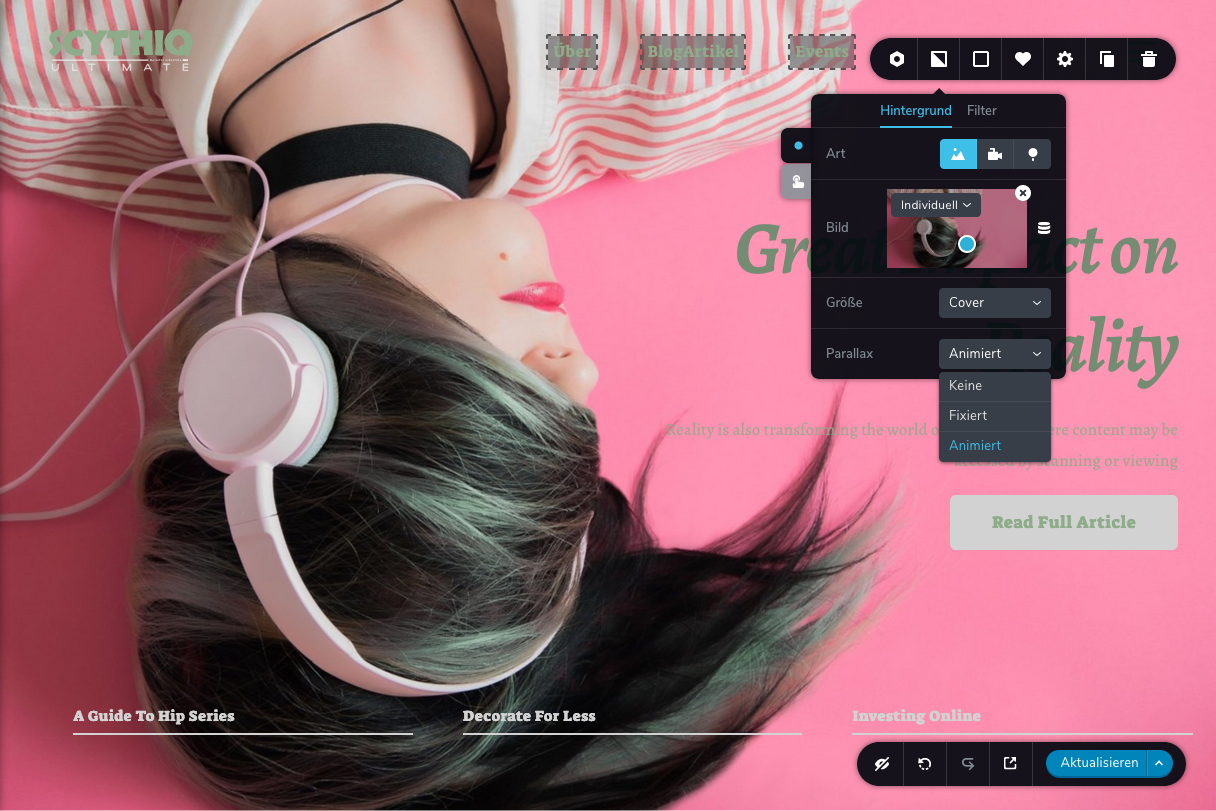
I was able to narrow down the technical problem of the background images in full screen mode. The causes are the settings of the parallax option "Animated" and "Fixed".
Furthermore, the attempt to load a second backround image in another block after the first block with background image is in this context. But to load another block via a blank template with backround image "bottle in hand" unfortunately fails since the last Brizy updates! (see the example file below in the link "2-Hero-Backround-Images-Layout-2023-06-28.zip" or the corresponding link).
It is reproducible on all kinds of end devices with different operating systems. In addition, I did a complete staging of my website and further uninstalled all other WP plugins in this copy of my website to be able to exclude these possible error sources. Only Brizy and WordPress pure!
So here is a "Fullscreen Hero-Image" test website with the four variants
https://scythiq.com/staging/fullscreen-hero-image-testsite/With Brizy-Block / Hero-Template
Beispiel #01 Parallax-Option "Animated"With Brizy-Block / Hero-Template
Beispiel #02 Parallax-Option "Fixed"With Brizy-Block / Hero-Template
Beispiel #03 Parallax-Option "None"With Brizy-Block / Blank-Template
Beispiel #04 Parallax-Option "None" (Background image cannot be loaded!!!)For example #01 Parallax option "Animated
In the Brizy-Builder everything seems to be OK at first, but in the web browsers with different screen widths and resolutions it is no longer OK. You can already see this in the desktop browsers by reducing the window width and then, importantly, reloading the website (possibly also clearing the cache and reloading!). Otherwise, directly on the mobile devices.Screenshot
On which operating systems and devices did I test the websites?
- My current systems: MacOS, iPadOS, iOS, Win 10 and Android.
- Web browsers: Safari, Firefox, Edge and Chrome.
- Current hardware: MacBook Pro, iMac's, iPad's, iPhone and Android phone.
Everywhere with the same result. While everything is OK in all desktop browsers on MacOS and Windows at large screen resolutions, in mobile web browsers, whether tablet or smartphone, the heroes are only displayed halfway and shifted upwards.
>> Please fix this very annoying error. <<
Here is an overview of the results:https://scythiq.com/staging/fullscreen-hero-image-testsite/
- 4-Hero-Backround-Images-Layout-2023-06-28.zip
- https://www.dropbox.com/s/a49x1mrfsqk98mv/4-Hero-Backround-Images-Layout-2023-06-28.zip?dl=0
- https://www.dropbox.com/s/z17yq8xp5k6wkmg/Screenshot-2023-06-28-Hero-Image-FullscreenTestsite-with-Brizy.png?dl=0
https://scythiq.com/staging/hintergrundbild-laden/
- 2-Hero-Backround-Images-Layout-2023-06-28.zip
- https://www.dropbox.com/s/48iyggjhta0nzjw/2-Hero-Backround-Images-Layout-2023-06-28.zip?dl=0
My suggestion for a temporary solution would therefore be:- Do not activate the parallax option "Animated".
- Maybe not activate the parallax option "Fixed"!
At least until the aforementioned technical errors in the Brizy-Builder have been ironed out.
It is a great pity that the background images, since the last Brizy updates, with the Parallax Option "Animate" no longer work in mobile systems. My heartfelt request is, make this feature available again for mobile devices in Brizy.
Also, in this context, the attempt to load a second backround image in another block. Unfortunately, this still fails so far.
As a designer, I like working with Brizy because I like the concept of the free design options and the coherent operation.
Unfortunately, since I don't have the time, I can't do more for you and this thing with your otherwise very great website builder Brizy.
Wish you all the best and much success guys.
Keep up the good work.
Kind regards
NiK
0 -
Hi NiK,
I want to thank you for your time and the detailed information you gave me about this problem. I would like to confirm that we can also reproduce the issue and have already notified our senior support team. I will get back to you as soon as I receive an update.
If you have any further inquiries or require additional assistance, please don't hesitate to reach out.
Best regards,
Ariel H.0 -

I am also having the same issue but in Brizy Cloud. All my client's website's hero sections are affected. Images look fine in desktop view.
The mobile edit view looks great, but when I check on different mobile devices the images on the Hero enlarge and shrink in dimensions.
0 -

Hi Ryan,
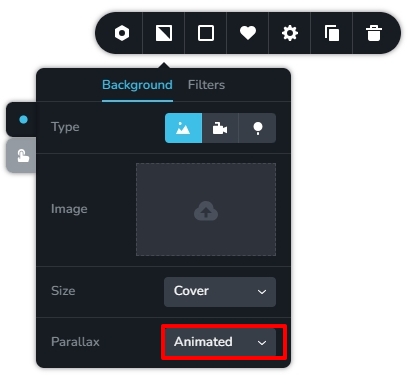
The animated parallax effect in Brizy Cloud has a bug. When adding the 'Animated' parallax effect for your background images, the image gets enlarged on mobile device. To fix this issue, please use the 'Fixed' parallax or set Parallax to 'None' for your background images.
 0
0

Please sign in to leave a comment.
Comments
5 comments