Carousel

I am having a similar problem on Brizy Cloud that others seem to have had on Brizy WP: I built a carousel on my page https://www.redner-veraenderung-psychologie.de/.
The carousel is visible on desktop and invisible on mobile. I just see the empty background. What did I do wrong?
-

Hi Stephan,
Another user had exactly the same problem few days ago. https://support.brizy.io/hc/en-us/community/posts/16062766152849
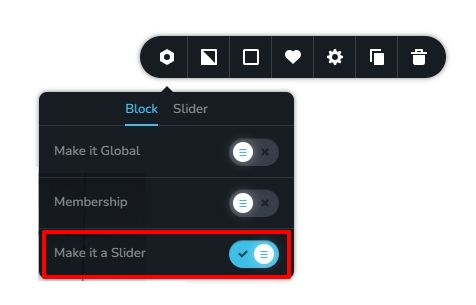
In his WordPress Dashboard, the carousel block was also made into a slider by choosing the 'Make It a Slider' option in the block settings. When I disabled this option, the carousel started displaying well in the mobile. Can you check the same in your project?
If this does not help, we will need access to your project to help fix the issue.
 0
0 -
OK, I solved this problem, thanks.
Hint to Brizy: The button you refer to is not shown in mobile view, only in desktop view.
I have another challenge. This one only applies to desktop view:
I have loaded 8 pictures into the carousel. The most left one is not loading correctly.
The slot appears empty for most of the time, until it has moved all the way to the left. Only then it is shown, to immediately disappear into the left border of the screen. When this picture appears on the right side, it is empty again.
So how can I make the carousel show ALL of the pictures?0 -
Hi Stephan,
I do not see the issue you have mentioned at my end. All the 8 logos appear correctly. Here is a screen recording. https://jmp.sh/H9SWuxco
 0
0 -
In your video the utmost left logo is missing, too. You can clearly see the gap between eon and aon.
Here is my screen recording: https://share.getcloudapp.com/d5uDWAGr
When you look at my screen recording, you see a gap. The gap fills up only when it reaches the left side.
The upper row shows a gap between eon and aon. The lower row shows a gap between Zurich and FAZ-Institut.0 -
Hi Stephan,
I imported your carousel to one of my projects and deleted two of your logos and the carousel started working fine. Please have a look at https://digital-works.brizy.site/carousel
Could you try deleting the same logos at your end and see if that makes a difference? If the carousel works fine after deleting the two logos, try recreating the logo files again and reupload it.

 0
0 -
This worked for me, thanks.
I have a suggestion for improvement of the carousel:
Only a maximum of 6 are shown on screen simultaneously. When you have say 10 pictures, it is very challenging to edit the other 4, because in edit mode you cannot access them. A workaround is to activate a temporary navigation and then switch it off later. There should be a more elegant way to edit ALL of the pictures of a carousel.
0 -
Hi Stephan,
It is possible to navigate to carousel elements outside the viewport using Arrows and Dots. Please watch this video for the procedure. https://jmp.sh/PnsqypGa
0
Please sign in to leave a comment.
Comments
7 comments