Issues with Image Links in Brizy Builder

Dear Brizy Support Team,
I am reaching out to report a persistent issue I'm encountering with the Brizy builder on my website. While the website itself displays correctly, upon entering the builder, I find that the image links appear broken. This issue continues even after replacing the images with new ones, as they do not seem to load properly.
In an attempt to resolve this issue, I have undertaken the following steps:
- Deactivating all plugins to rule out conflicts.
- Updating both Brizy and Brizy Pro to the latest available versions.
- Testing with the default WordPress themes, which are also up to date.
Unfortunately, none of these actions have resolved the problem. I would appreciate any guidance or assistance you can provide to fix this issue. It's crucial for the proper functioning of my website, and I rely heavily on the Brizy builder for site management.
Thank you for your attention to this matter. I look forward to your prompt response and solution.

-

Hi Jorge,
Thank you for reaching out to us.
If by any chance your site is hosted by GoDaddy, please try to temporarily disable CDN and see if this helps.
https://support.brizy.io/hc/en-us/community/posts/16253415219858If the issue persists, would it be possible for you to provide us with temporary access to your WP Admin? You can add us as an Admin user and send the following details to communitysupport@brizy.io:
- Community Support link: https://support.brizy.io/hc/en-us/community/posts/16253415219858
- Admin User:
- Password:Please make a full backup of your site as a precaution.
I am looking forward to your response.
Best regards,
Ariel H.0 -
Hi Jorge,
Thank you for your cooperation.
After checking, it seems like the problem is connected to the CORS Policy on your server.

I suggest reaching out to your hosting provider for assistance in resolving this issue. Alternatively, you can try to fix it yourself by following the steps outlined in this link:
https://hostarmada.com/kb/websites/what-is-cors-and-why-am-i-seeing-errors-on-my-website-because-of-it/Please try this and let me know how it goes.
Best regards,
Ariel H.0 -
Hi Jorge,
Thank you keeping in touch.
To further investigate this issue, could you please provide us with temporary access to cPanel? This will allow us to take a closer look and better understand the problem. Kindly send your cPanel credentials to communitysupport@brizy.io.
Thank you for your cooperation.
Best regards,
Ariel H.0 -
Hi Jorge,
Thank you for your cooperation.
Upon checking, there were some directives in the .htaccess file causing the issue. To address this, we backed up the old .htaccess file and created a new one based on the default directives suggested at this link:
https://wordpress.stackexchange.com/questions/45898/default-htaccess-file-for-wordpress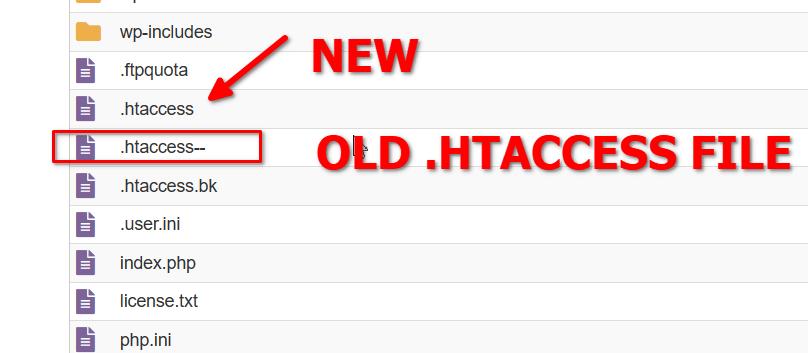
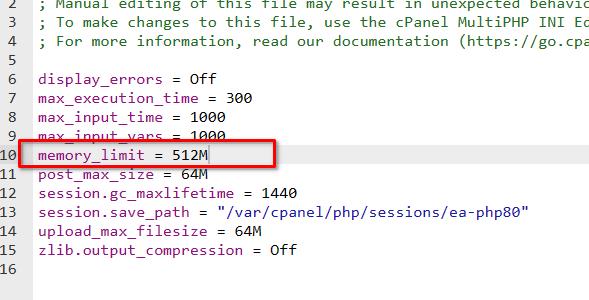
We also increased the PHP Memory Limit from 256M to 512M in the php.ini file to allow faster page editing.
Finally, you will need to choose between LiteSpeed Cache or WP-Optimize. It is not advisable to run two cache or optimization plugins simultaneously. We have temporarily disabled WP Optimize.
After making the above changes, I inspected the rest of the pages and the issue no longer occurs. A screencast was sent to you privately via our community support email.
If you have any further questions, please let us know.
Kind regards,
Ariel H.0
Please sign in to leave a comment.
Comments
4 comments