Couple Small Issues

Hello,
I've been experiencing a couple inconvenient issues while creating websites.
The first is that the icon hover color is never the one I picked. As seen below, the hover is green when I picked the same color the other two are (so there isn't a hover color, just remains solid). I don't have this issue with buttons, just the icons. I think it also only happens if I try to make it the same color. Any icons that have a different hover color seem fine. The ones in this image aren't links, so I don't want them to have hover colors because people will try to click on them and think something isn't working.

Another issue is that I upload PDFs a lot on a couple sites and now the media gallery doesn't show files. When I try to link a PDF on the Brizy page builder, it only includes images. This is very inconvenient due to the large number of times I have to link files, and I have had to re-upload a file just to have it linked if something happened, and I have to redo it. There isn't another way to get files linked other than adding them into the gallery. So any file uploaded into the Media Gallery first, won't be available to be linked while editing a page.
All sites are Brizy V 2.4.21 and Pro 2.4.19 with the latest WordPress version.
-

Hi Brooke,
We sincerely regret any inconvenience. We are working to resolve these issues. Let me offer a workaround you can use in the meantime.
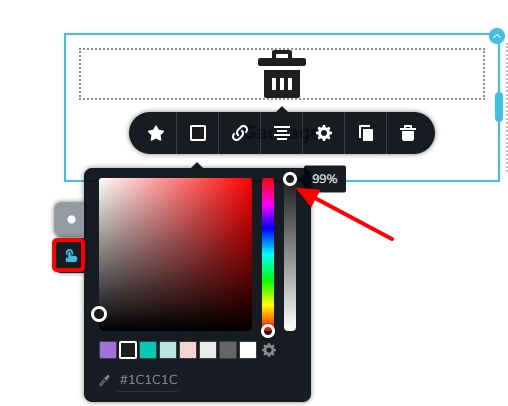
- Icon hover color: When setting the same color for normal and hover and the hover color is at 100% it does not take effect. If you set the hover color to 99% or below, the color will take effect. Please try it out.
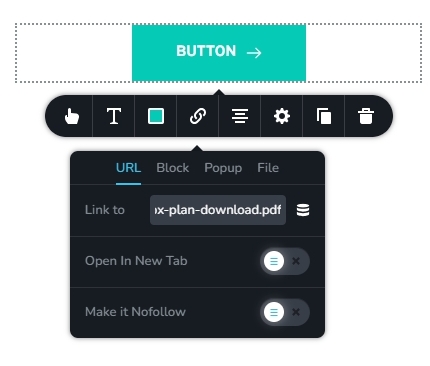
- Link to a PDF File: In your WordPress Dashboard under Media - Library, please select the PDF File. On the right pane, click on the 'Copy URL to clipboard' button. Then in your Brizy page, select the element you want to hyperlink to the PDF file. In the link tool bar under the URL tab, paste the PDF URL.
 0
0 -
The 99% hover opacity works great! Thank you, KC! The URL one definitely will work when I have to reattach a file that's already uploaded, so thank you for that tip as well.
0
Please sign in to leave a comment.
Comments
2 comments