Post element pagination 404 error.

Hi,
On various pages I use the post elemnt with pagination for navigation on my archive page templates..
I have this set to 1 row with 3 columns, i.e. 3 post previews are displayed at a time. However if I click on 2 of the navigation panel at the bottom it adds /bpage/2/ to the end of the blog archive url and returns a 404 page. This is also true of page 3(/bpage/3/), page 4 (/bpage/3/) etc.
I believe this stated happening after updating the latest plugin.
Brizy Free Version 2.4.21
Brizy pro Version 2.4.19
Regards
Wayne
-

Hi Wayne,
Thank you for contacting us.
This issue is not related to the recently reported issues with the new updates.
Please try to update or change the Blog pages to show at most and see if this addresses the issue - https://prnt.sc/MIZRISNBaMEF
Please try this and let me know how it goes.
Best regards,
Ariel H.0 -
Hi,
Thank you for the reply. My setting already replicates yours in the screenshot.
However rather strangely the problem appeared to rectify itself with no change or update from myself. I am also experiencing other issues that maybe a cacheing issue which I will raise seperately. Although clicking on the navigation pages now displays the next three post previews as expected with just one issue:
On a blog page template below the article contents I have a post element displaying posts from that articles category. So depending on the article length the reader maybe way down the page to see the post element - and when they click on the page navigation to see more posts in the preview the page is correctly displayed i.e. containg the article with the post element at the bottom of the content (moved along by another three post i.e. /bpage/2/ however the focus takes the user back to the very top of the article, is this the intended behaviour?
i.e. what I would prefer would be: User reads and scrolls to the bottom of the article, sees the post element, clicks for page 2 to see three more post previews but focus still remains on the post element at the bottom and NOT at the very top of the page, requiring the visitor to scroll all the way back down again.
Kind regards
Wayne
0 -
Hi Wayne,
Thank you for the update. I'm glad to hear that the issue has been resolved.
Regarding the focus of the page after clicking the page navigation menu, currently, there is no option to customize this behavior. It functions as intended, and while we acknowledge that it may not be ideal, we don't have an alternative solution to offer at this time. Rest assured, we have noted this as an area for improvement and it's on our list of potential enhancements.
We apologize for any inconvenience this may cause.
Best regards,
Ariel H.0 -

I am experiencing a similar issue as my Pagination is taking users to an 404 error page. I am not using more than one Post element on this Archive page template. I am only using the Archive element to display the Category that is appropriate to this page.
Here are two examples, one is using the Category "News" and the other is "Webinar Recap". I don't believe this was an issue with previous versions of Brizy and I'm not sure when the problem started, but I was alerted to it by a user. Can you please help? I am using a Page Template that is Archive (not Single) and then the Brizy element I am using is the Archive to display the relevant Posts.
https://visionzeronetwork.org/news/
https://visionzeronetwork.org/category/webinar-recap/
This is very important to fix so please escalate this.
0 -
Hi Eric,
Thank you for reaching out to us.
Please update Brizy to the latest version. After updating, clear all caches / purge all cache and check if this resolves the issue.

Additionally, consider clearing your browser cache or trying a different browser to verify the issue.
Kind regards,
Ariel H.0 -
Thank you, but a recent update of Brizy caused other issues on our site. I will try on a staging copy, as I'm afraid to run these updates on our live site, where a couple weeks ago the updates caused major issues.
0 -
I just ran the plugin updates on a Staging copy of the site and the same issues that occurred with the last update are occurring here. The Custom Post Type template is not loading properly. There is something wrong with your current version of the theme that is not working with our installation, so I cannot make the plugin updates on our live site and I had to previously revert back to an older version of the plugin.
See the issue at the link above as compared to the live site here:
0 -
Hi Again,
I went to the Permalink settings and selected "save" without changing anything. That seems to have resolved the Pagination issues on the Archive element. However, the newest version of Brizy is still causing issues on our Staging copy of the site, so we are not comfortable installing it on the live site. This is the page for a Custom Post Type "Webinars" and the CSS and theme of the site does not load properly.
Please escalate this issue as I do not understand why the new version of your theme is leading to more problems. This has happened several times with new releases of the plugin. I have provided admin login credentials to you before. Can you please help diagnose and solve this problem?
0 -

Hi Eric,
We prefer to have access to your staging as you have updated Brizy on it. We'll try to resolve the problem on staging. Later on, you will be able to make the same change on your live site.
Kindly add a new user to your Staging WordPress Dashboard and send the following details to our email: communitysupport@brizy.io
- Community Post link: https://support.brizy.io/hc/en-us/community/posts/16196546023569
- WordPress Admin URL:
- Username
- Password
Please let us know in this forum when you send us the email.
0 -
Ok, thank you. I just sent the information to the email you provided. Please prioritize reviewing this issue.
0 -
Hi Eric,
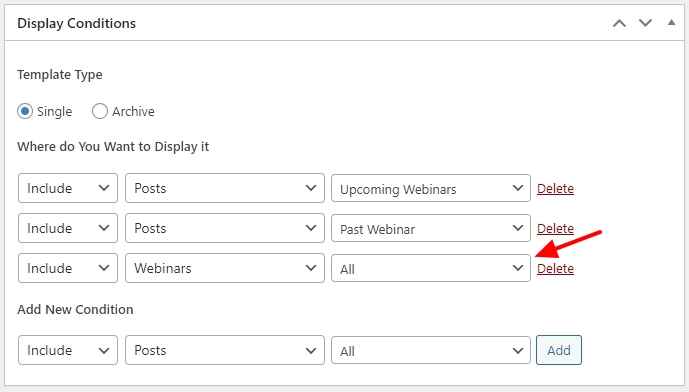
The display condition needed to apply the template to the Webinars CPT was left out of the Brizy template for Webinars. The webinars are now displaying well since I have added the necessary display condition. Kindly check.
 0
0 -
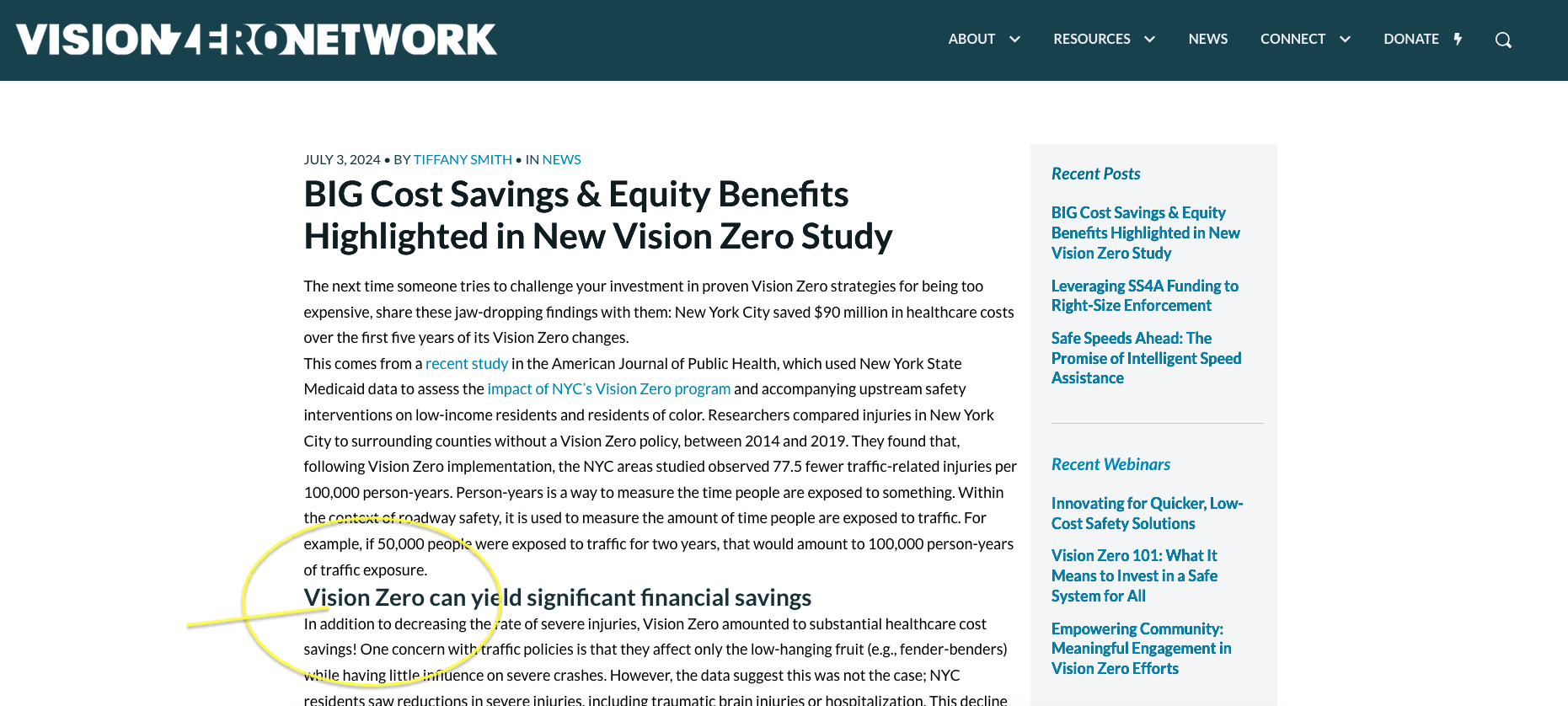
Ok, that seems to be working on the Staging environment. I rolled it out to the live site and that issue is resolved, however another issue has come back. Now on the Blog Posts, the spacing of text (Headings, Paragraph, etc.) is not correct. There is not space between the different paragraphs and headings now. I have had a lot of back and forth with your support team before to fix typography issues and it seems with every version of Brizy, another issue happens or comes back. See here and screenshot included.
https://visionzeronetwork.org/big-cost-savings-equity-benefits-highlighted-in-new-vision-zero-study/
 0
0 -
I was told in the past by your Support to use the dynamic #postcontent instead of the Brizy Post Content element to fix these typography issues. Now the dynamic one does not work. If I switch to the Post Content element now, it brings back the issue of the Font Size changing when hovering over the post content area, see the screen recording here:
https://drive.google.com/file/d/1XQ3phRHUU6FWlWYdM3B_cJDYZaImlnQ8/view?usp=sharing
0 -
I think I figured out the issue, it is doing this only on Heading text that has been made BOLD. Can you provide some CSS to avoid this so I don't have to go back and revise all my Headings in case they have a Bold format?
0 -
Hi Eric,
Do you still have the issue of decreasing text size on hover? I could not see a page where this happens. Kindly share with us a URL of the page where we can see this.
0 -
I can't find an example right as we fixed many of them already. If I find the issue again, I will submit a new comment.
0
Please sign in to leave a comment.
Comments
16 comments