Brizy 2.4.21 and GoDaddy CDN Incompatibility

I am unable to insert or change any images using Brizy 2.4.21 when the GoDaddy CDN is enabled.
This problem did not exist with Brizy 2.4.18.
Any idea when this can be resolved?
-

Hi Richard,
This is a known bug and we are working on a fix. In one of the future updates, we will roll it out. In the meantime, if you would like to roll back to the previous versions, here are the ZIP files and the procedure.
- Brizy 2.4.18: https://jmp.sh/7jb1iP24
- Brizy Pro 2.4.17: https://jmp.sh/xzdANfh4
Please follow this procedure to roll back.
- Deactivate and delete Brizy Pro
- Deactivate and delete Brizy
- Download Brizy 2.4.18 and in your WordPress Dashboard under Plugins - Add New - Upload Plugin, upload Brizy
- Download Brizy Pro 2.4.17 and under Plugins - Add New - Upload Plugin, upload Brizy Pro
0 -
Thanks for the quick response!
FYI - Been using Brizy for years and couldn't live without it! Great job! 😉
0 -
It seems like this is still an issue. Will this be resolved in a future update?
0 -

Hi Richard,
Thank you for contacting us.
Please follow the steps in the link below to regenerate image thumbnails and see if this resolves the issue:
https://ph.godaddy.com/help/fix-image-thumbnails-not-displaying-27215
Additionally, try setting the image to "Original" instead of a custom size.
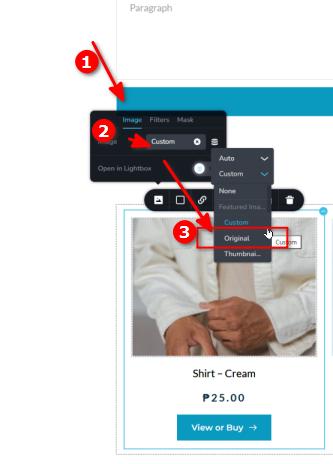
Please give these a try and let me know if they help.
Best regards,
Ariel H.0
Please sign in to leave a comment.
Comments
4 comments