File link not showing files other than images

Hi,
I am trying to add a "file link" to a text box. I want to select a pdf that I have already in my media library but i can only see images, there is no way for me to see other kind of files.
I have brizy 2.4.21 and pro 2.4.19
I have disabled plugins other than brizy.
my website is : https://auditor.imperialcounty.org/ but this is happening in all of my sites now.
Here is an image of how it looks when I'm trying to choose a file for the file link, as you see, the filter media only shows images : 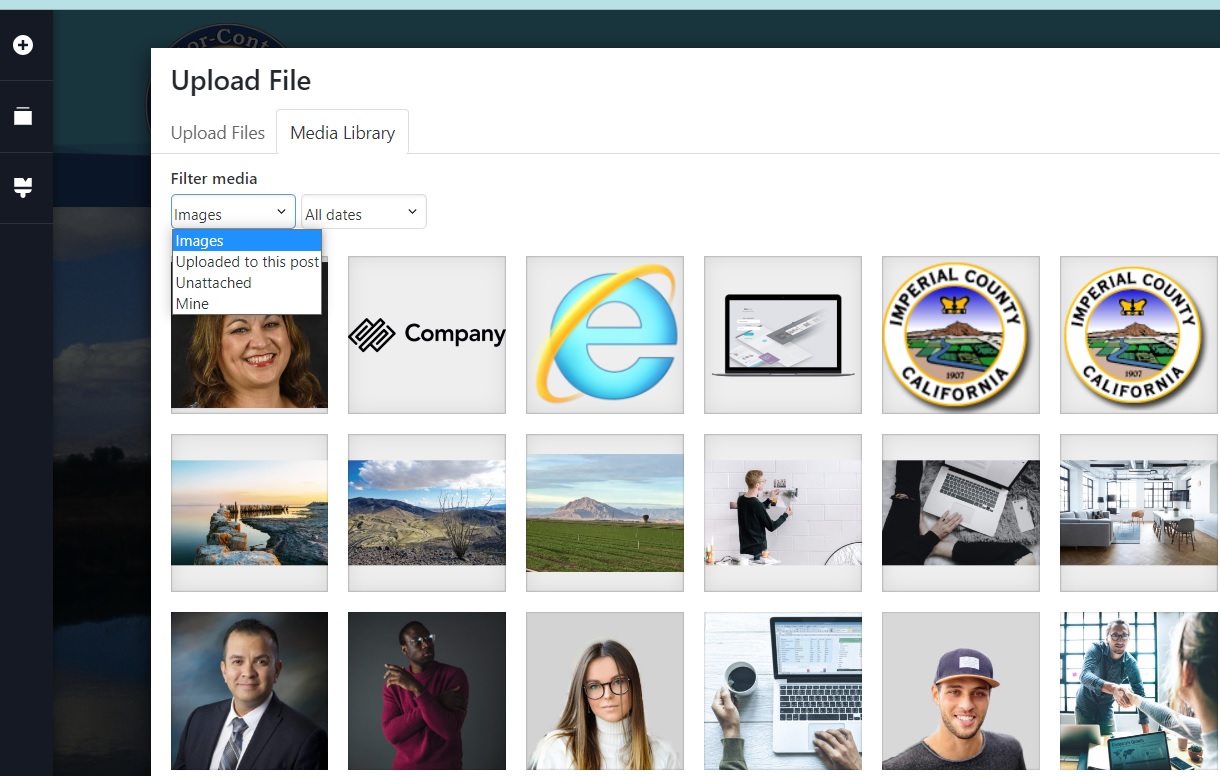
Thank you,
Leonel
-

Hi Leonel,
We apologize for this inconvenience. This is due to a bug with the most recent Brizy versions. We are working on fixing this issue. In the meantime, please use this work around.
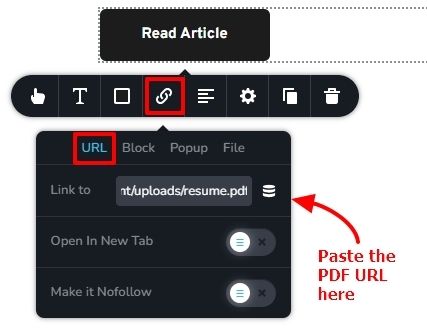
In your WordPress Dashboard, under Media - Library, click on the PDF file you wan to link to. On the right pane, click on the button 'Copy URL to Clipboard' https://jmp.sh/zsz94L4m In the Brizy Editor, click on the Text box you wan to link to the PDF and then on the 'Link' icon. Under the URL tab, paste the PDF URL and save your work.
 0
0
Please sign in to leave a comment.
Comments
1 comment