JPG Images Not Displaying in Brizy Editor

Hi guys,
Since the latest update, the Brizy Editor will not push JPG images from the media folder to the live editor - see video.
The second image I try to use is an SVG and works, so could be an issue with JPG?
Please find video demonstration: https://jumpshare.com/v/5SmlS4ITO8UOkAg8NIUI
Thanks
-
Update: I have noticed that the site experiencing this issue is hosted with Blue Host. This issue is not happening on client's sites hosted with other providers.
0 -

Hi Chris,
Please try out these ideas and check it helps resolve this issue.
- Are you using Jetpack? If you are, under Jetpack - Boost, disable the 'Image CDN' option. https://jmp.sh/FUSoE1ZP
- Have you enabled a CDN in your Bluehost account? Please disable the CDN temporarily
- If you are using Iubenda plugin, please disable it temporarily
- If you have embedded external code using the Brizy Embed Element, please remove the code temporarily, save the page and refresh it and check again
If none of the above ideas help, we will need access to your WordPress Dashboard to troubleshoot this issue for you.
0 -
Thanks, I actually disabled "Image Acceleration" in Jetpack and this has worked for some reason.
0 -

Hi none of it works for me. Give me a solution as it is for our company website and the logo has been changed.
0 -

Hi Mushthaq,
We have just released an update: https://prnt.sc/D_bhzdSfmxrP
Could you please try it and see if this works for you?Otherwise, please provide us with some screenshots to demonstrate the problem.
Also, provide temporary access to your WP Admin credentials, so we can further check the issue. Add us as a user to your WordPress Dashboard and send the following details to: communitysupport@brizy.io
Community Post link: https://support.brizy.io/hc/en-us/community/posts/15952190682257
WordPress Admin URL:
Username:
Password:Please make a full backup of your website as a precaution.
I am looking forward to your response.
Best regards,
Ariel H.0 -
Hi i've updated it and still not working for me. I have send the Admin credentials with you so please do the needful urgently.
0 -
Hi Mushthaq
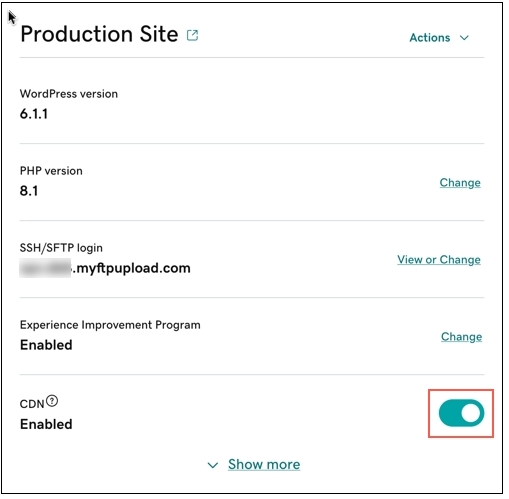
Brizy's recent versions are incompatible with GoDaddy CDN. Please sign in to your GoDaddy account and check whether you have the CDN option enabled. Disable the CDN as per the instructions in this article. Enable or disable my CDN
Once you disable the CDN, please try uploading the logo again.
0 -
Hi, I've done that yesterday itself. CDN is already disabled.
0 -
Hi Mushthaq,
Images are still being served from the CDN. For example, please have a look at one of your images here
Can you please doublecheck if the GoDaddy CDN is disabled? Can you also check with GoDaddy support why images are still being served from the CDN?
 0
0

Please sign in to leave a comment.
Comments
9 comments